Stand-in skills
Product Discovery
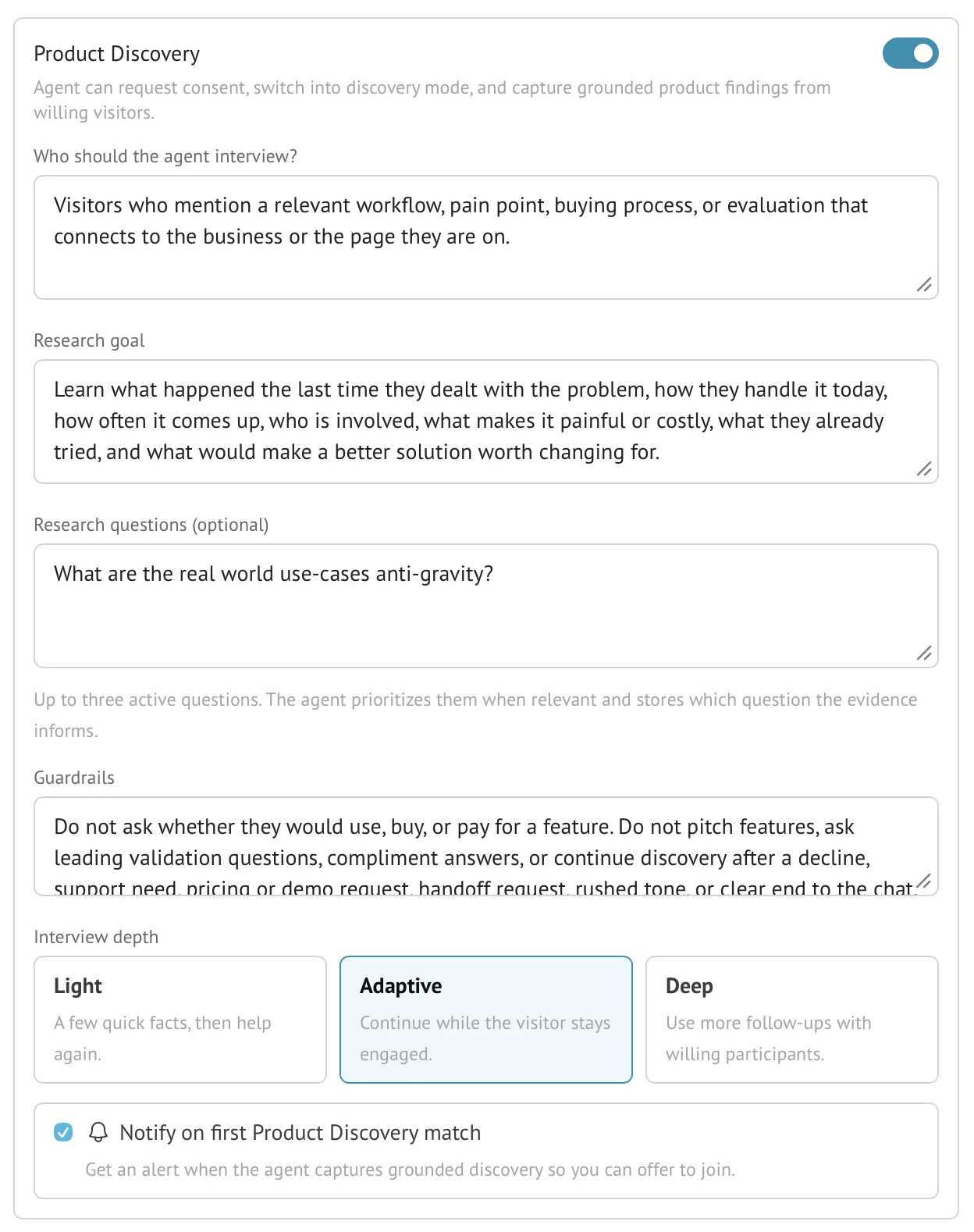
Product Discovery lets an AI Stand-in recognize a relevant research opportunity, ask the visitor for explicit consent, and conduct an adaptive interview without replacing the visitor’s original request. Captured findings are saved with transcript evidence and a built-in Product Discovery label for later review.
- Availability
- The conversation skill is available on all plans; AI digest reports and longer searchable history require Pro or Business
- Configured in
- Dashboard → Stand-ins → select a Stand-in → Edit → Skills → Product Discovery
- Category
- Stand-in skills
- Reference status
- Current
Before you begin
Plan availability: The conversation skill is available on all plans; AI digest reports and longer searchable history require Pro or Business.
Prerequisite: A saved Stand-in with Product Discovery enabled and configured; the visitor must explicitly consent before discovery questions begin.
Key boundary: Product Discovery is not permission to interrogate every visitor or turn support, pricing, navigation, demo, or factual requests into research. The skill instructs the AI to prioritize consent and the visitor’s original request; review transcripts to check that it follows those instructions.
Configure the research contract
| Setting | Purpose |
|---|---|
| Who should the Stand-in interview? | Candidate criteria describing the workflows, pains, evaluations, or buying processes that make discovery relevant. |
| Research goal | The evidence the organization wants to learn from willing visitors. |
| Research questions | Up to three current questions, each up to 240 characters, used to associate captured evidence with a specific learning need. |
| Guardrails | Situations, question styles, or topics the Stand-in must avoid. |
| Interview depth | Light uses a few quick facts, Adaptive continues while engagement remains useful, and Deep permits more follow-ups with willing participants. |
| Notify on first match | Alerts the Stand-in owner when the first grounded Product Discovery result is captured in that conversation. |
Consent and answer-first behavior
A matching candidate is not automatically an interview. The Stand-in first provides substantive help for the visitor’s actual question. If a distinct discovery opportunity remains, its first discovery question must be a short, explicit permission request.
The skill instructs the Stand-in not to ask workflow, team, incident, impact, or fit questions before consent, and to stop on a decline, frustration, support need, pricing or demo request, handoff request, rushed tone, or clear end. These are AI behavior rules, not a guarantee that every generated response follows them; review real exchanges and refine the saved guardrails when needed.
Adaptive interview behavior
- Questions adapt to what the visitor has already said instead of reading a rigid survey verbatim.
- The configured research questions are priorities when relevant, not a requirement to ask all three in every chat.
- The depth choice sets an effective question budget: Light defaults to 3, Adaptive to 5, and Deep to 8, within the supported range of 1 through 8.
- The Stand-in returns to helping and stops when the visitor disengages or a guardrail applies.
- The interview instructions exclude hypothetical willingness-to-pay and leading solution-validation questions as evidence of real behavior.
Labels, findings, and evidence
When the Stand-in captures a grounded discovery result, Stand applies the built-in Product Discovery label and retains a finding tied to the supporting conversation evidence and, when applicable, the configured research question.
- The built-in label appears in live monitoring, History filters, and relevant digest analysis.
- It does not consume the Pro or Business active custom-signal quota.
- AI digest reporting can synthesize findings across conversations on Pro and Business and should report insufficient evidence when the period does not support a conclusion.
- The transcript remains the evidence source; a synthesized finding is not a substitute for the visitor’s actual words.
Validation and boundaries
- Candidate criteria, research goal, and guardrails are each limited to 2,000 characters.
- At most three non-empty research questions can be saved, and each is limited to 240 characters.
- Notifications occur on the first grounded Product Discovery match rather than every later message in the interview.
- The feature does not guarantee representative research, statistical significance, or factual correctness of visitor claims.
- Retention and plan rules determine how long the underlying conversations remain searchable.
Example
The screen below shows the feature in its normal Stand context. Labels and surrounding controls may vary with account state and plan.