The 100 Conversations Method: Turn Product Traffic Into PMF Signal
If people visit, sign up, or try your product but do not convert, do not guess why. Use founder-led conversations to learn what users expected, where they got stuck, and what they would pay for.
June 4, 2026
A lot of early products have attention before they have clarity.
People visit the website.
Developers fork the repo.
Users create accounts.
Someone tries the free plan.
A few people ask questions.
Most disappear.
From the outside, this can look like traction. From the inside, it is confusing.
You can see that people are interested, but you still do not know the important things:
What did they think the product was for?
What problem were they trying to solve?
Why did they not continue?
What would have made the product worth paying for?
Which users are just curious, and which ones have a real business problem?
Which missing feature is actually a buying blocker?
Which message made sense, and which message confused them?
Analytics can tell you where people dropped off.
It cannot tell you what they misunderstood.
That is why early teams should talk to the people who are already showing intent.
The goal of the 100 Conversations Method is simple:
Before you rebuild the product, rewrite the website, or change pricing, get 100 conversations with people already visiting, using, evaluating, or abandoning your product.
Not 100 survey responses.
Not 100 anonymous pageviews.
Not 100 AI-generated summaries detached from the original user.
100 real conversations.
Some will be short. Some will be shallow. Some will be support questions. Some will not be useful at all.
But a small number will change how you think about the product.
Those are the conversations you are looking for.
The method in one sentence
The 100 Conversations Method is:
Turn high-intent product traffic into conversations, turn conversations into evidence, and turn evidence into decisions.
The output is not “we had 100 chats.”
The output is:
sharper positioning,
better onboarding,
clearer packaging,
better pricing questions,
better sales follow-up,
better docs,
better roadmap priorities,
and a more realistic view of who the product is actually for.
The method works because early product teams usually do not lack opinions.
They lack enough direct evidence from people who are already close to using or buying.
Why 100 conversations?
100 is not a magic number.
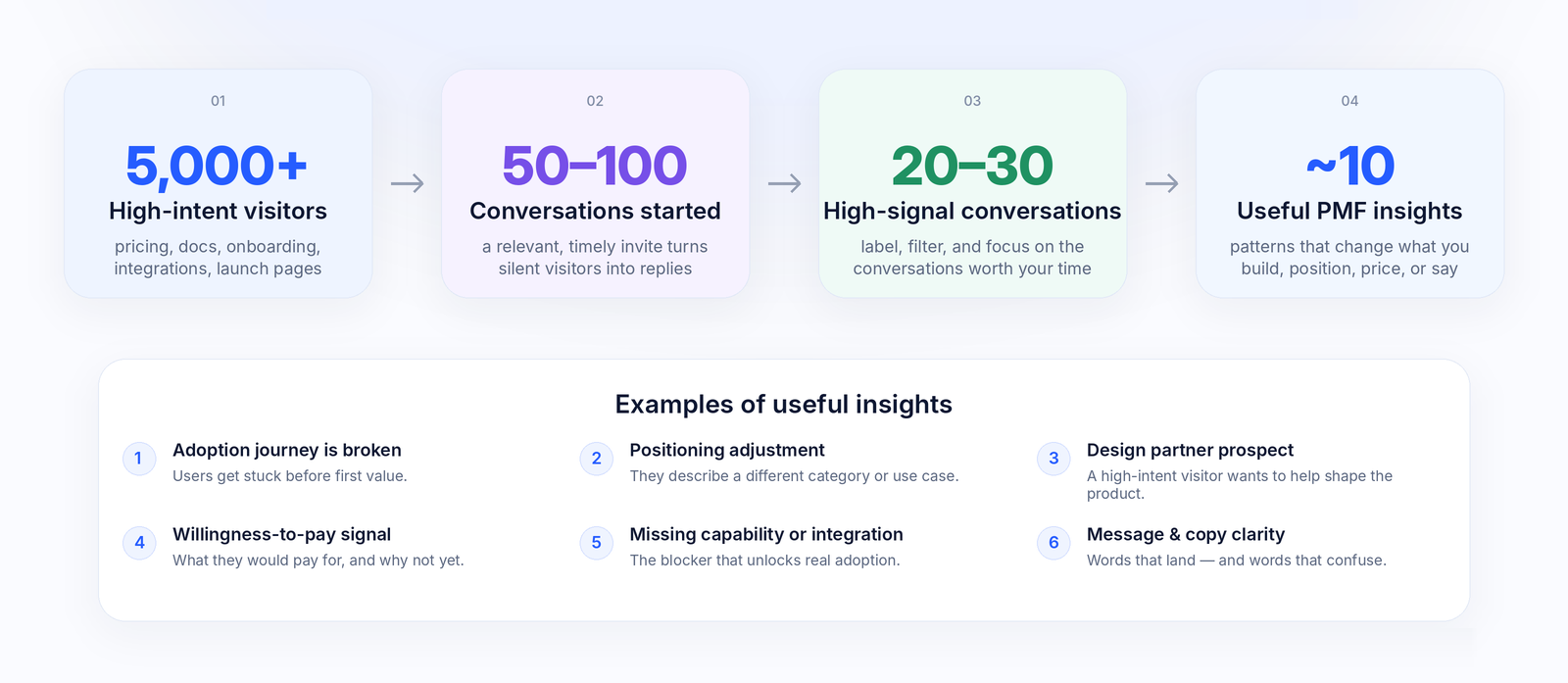
You can learn something from 5 conversations. You can often see early patterns after 20. By 50, you should have real signal. By 100, repeated patterns become much harder to ignore.
The reason to use 100 is that it creates a serious enough target.
If you only talk to 5 people, you may overfit to whoever happened to reply first.
If you aim for 100, you are forced to build a repeatable learning loop:
Put yourself where high-intent users already are.
Start conversations at the moment of confusion or interest.
Ask better questions.
Label and review the patterns.
Change messaging, onboarding, packaging, pricing, follow-up, or roadmap based on what repeats.
Use 50 as the first milestone and 100 as the full method.
At 50 conversations, ask:
Are we attracting the audience we expected?
Do people understand what the product is for?
What are the most common blockers?
Which use cases repeat?
Is there any willingness-to-pay signal?
Which conversations should we follow up on?
At 100 conversations, ask:
Which patterns survived the second 50?
Which objections are real buying blockers?
Which segment has the strongest urgency?
Which features belong in paid packaging?
Which words should we use on the website?
Which users should we stop trying to serve?
Research on qualitative learning supports the general idea that small numbers of well-targeted conversations can produce meaningful insight. A systematic review of qualitative saturation found that many studies reached saturation with 9–17 interviews when the audience was relatively homogeneous and the research objective was narrow. Usability research has also long argued that small batches of qualitative sessions can reveal many important usability problems, especially when teams iterate between rounds.
The 100 Conversations Method is not about statistical proof.
It is about finding the patterns that are obvious once you finally hear users explain them in their own words.
What is Stand?
Stand is human-first website chat with AI stand-ins and live human takeover.
You install a lightweight chat widget on selected pages of your site. Visitors can talk to a real person when someone is available. When the founder, rep, or expert is away, busy, or at capacity, a named AI stand-in answers transparently and can hand the conversation back to a human.
For this method, Stand is useful because it is not just a generic support bot. It helps you run a product-learning loop from real website conversations:
Product Discovery lets an AI stand-in ask for consent, switch into discovery mode, and capture grounded findings from conversations that match your research goals.
Labels help you spot conversations worth reviewing or joining, such as high-intent buyers, confused evaluators, pricing blockers, migration blockers, unexpected use cases, or enterprise signals.
Followup helps capture contact details and follow-up intent when the conversation calls for it.
History stores conversations so the team can review what visitors actually asked, said, misunderstood, and wanted.
JSON export lets you download matching conversations and analyze them in your favorite AI tools.
The method does not require Stand. You can do customer discovery manually.
Stand makes the loop easier to run on the traffic you already have.
The 100 Conversations Method works best when you already have some kind of interest, but not enough revenue clarity.
Good signals include:
website traffic,
free users,
trial users,
waitlist signups,
GitHub stars or forks,
docs traffic,
pricing-page traffic,
launch traffic,
community attention,
inbound questions,
demo interest,
people using the product but not inviting their team,
people trying the product but not paying.
This is especially useful for:
founder-led B2B SaaS,
devtools,
AI products,
open-source projects trying to monetize,
API products,
technical infrastructure tools,
product-led startups,
consultant-led or expert-led businesses,
teams with many free users but weak conversion,
teams with traffic but unclear messaging.
The method is less useful when there is no traffic, no audience, and no plan to create a traffic spike.
Even then, the smaller version still matters:
Do not waste the few high-intent visitors you already have.
A realistic expectation: conversations are rare, so place them carefully
Most visitors will not start a conversation.
That is normal.
Public live-chat benchmarks vary a lot by product category, traffic quality, page placement, prompt, and whether the chat invitation is passive or proactive.
One older live-chat benchmark reported that about 1.6% of website visitors became chatters on average, with proactive invitations increasing engagement materially. Another live-chat operator describes reactive live-chat engagement around 2% of site traffic and proactive engagement above 7% in its cited benchmark.
For early B2B products, a conservative planning assumption is:
100 high-intent visitors → 1 conversation
That gives you a simple planning model:
High-intent visitors
Conversations at 1%
Conversations at 2%
Conversations at 5%
500
5
10
25
1,000
10
20
50
2,500
25
50
125
5,000
50
100
250
10,000
100
200
500
Do not treat 1% as destiny.
Treat it as a conservative starting point.
The rate can be significantly higher depending on:
where Stand is placed,
how high-intent the page is,
whether the greeting is proactive,
how specific the question is,
whether the person offering to chat is a founder, expert, sales rep, or AI agent,
how urgent the visitor’s problem is,
how much trust the product already creates,
whether the visitor is arriving from a launch, event, community post, or direct outreach,
whether the prompt feels helpful or extractive.
This is something to optimize during the campaign.
Track the funnel:
Metric
What it tells you
High-intent visitors
Whether the page has enough opportunity
Widget shows
Whether Stand is actually being seen
Greeting opens
Whether the greeting creates curiosity
Chat starts
Whether visitors are willing to engage
Useful insights
Whether conversations are producing PMF signal
Follow-ups
Whether there is commercial or research value
Product changes made
Whether learning is turning into action
The goal is not to maximize chats at any cost.
The goal is to maximize useful conversations with the right visitors.
Expect only a fraction of conversations to be useful
Not every conversation will produce PMF insight.
Some visitors will ask simple support questions.
Some will be curious but not serious.
Some will want something outside your product direction.
Some will not reply after the first message.
That is fine.
A practical working assumption is:
5 conversations → 1 useful founder insight
That means:
Conversations
Expected useful insights
10
2
25
5
50
10
100
20
Your numbers may be better or worse.
The important thing is to measure insights, not just conversations.
A useful insight is something that can change a decision.
Examples:
Insight type
Example
Decision it affects
Positioning
“I thought this was for solo developers, not teams.”
Homepage, use-case pages, onboarding
Onboarding
“I connected the repo but did not know what to do next.”
Checklist, empty state, setup flow
Packaging
“We would need team permissions before paying.”
Pro or Enterprise plan design
Pricing
“This is useful, but I do not know what is included.”
Pricing page, FAQ, plan names
ICP
“The real buyer is the platform team, not individual engineers.”
Target segment, outbound, messaging
Docs
“I could not find an example for my framework.”
Docs structure, examples, guides
Sales
“We need security information before introducing this internally.”
Trust page, follow-up, procurement materials
Roadmap
“Everyone asks for the same integration before they can use this.”
Roadmap priority
The output of the method is not a research report.
The output is better decisions.
Start where silence is expensive
Do not place Stand everywhere on day one.
Start where a silent visitor hurts.
Good first surfaces include:
Pricing page
Visitors on the pricing page are already evaluating value, packaging, budget, or fit.
Good greeting:
Founder here — wondering which plan fits? Tell me what you are trying to do.
What you learn:
pricing confusion,
missing packaging,
budget range,
buyer type,
upgrade blockers,
what users compare you against.
Docs
Docs traffic can be high-intent, especially for devtools, APIs, infrastructure, and open-source products.
Good greeting:
Trying to set this up? Tell me what you are building — I can point you to the right example.
What you learn:
developer intent,
missing examples,
confusing setup steps,
integration blockers,
serious technical use cases.
Onboarding
Onboarding is where expectations meet reality.
Good greeting:
What were you hoping to get done today?
What you learn:
what users expected,
whether the first-run experience makes sense,
which setup step blocks activation,
whether the user’s goal matches your product.
Dashboard or empty state
A dashboard visitor has already shown more intent than a homepage visitor.
Good greeting:
Founder here. If this page is not showing what you expected, tell me what you were looking for.
What you learn:
product comprehension,
missing first action,
empty-state confusion,
feature expectation gaps.
Upgrade or paywall page
This is where willingness to pay becomes concrete.
Good greeting:
What is missing before this would be worth paying for?
What you learn:
paid feature expectations,
plan confusion,
team requirements,
enterprise blockers,
budget or purchase signals.
Cancellation or inactivity flow
People who leave often know exactly what did not work.
Good greeting:
What made this not worth continuing?
What you learn:
churn reasons,
false promises in marketing,
onboarding failure,
wrong audience,
missing urgency.
Launch page
Launch traffic disappears fast.
Good greeting:
Founder here during launch — what were you hoping this would help you do?
What you learn:
whether your launch message lands,
which audiences are interested,
which use cases repeat,
what people are skeptical about.
Event or conference page
A QR code, demo page, or event landing page can turn offline interest into follow-up.
Good greeting:
Met us at the event? Tell us what caught your attention and we’ll follow up with the right next step.
What you learn:
event lead quality,
which pitch worked,
follow-up context,
buyer roles,
urgency.
Use founder-led prompts, not generic chat prompts
A generic chat prompt says:
How can we help?
That is okay for support.
It is weak for product discovery.
A founder-led prompt says:
Founder here — what were you hoping this would help you do?
That is much better.
The prompt should make the visitor feel that a real person wants to understand their situation.
In Stand, the identity around the conversation matters. Use the visible parts of the chat experience deliberately:
the rep or agent avatar,
the greeting,
the title or visitor-facing brand line,
the lapel pin,
the AI badge when the stand-in is answering,
the page where the widget appears.
For example, a founder can make the invitation more credible by using a real photo, a title like “Co-founder,” and a greeting that explains why the conversation exists.
Good prompts:
“Founder here — what were you hoping this would help you do?”
“Trying to decide whether this fits your workflow?”
“Stuck in setup? Tell me what you are trying to build.”
“If you are evaluating this for work, what problem are you trying to solve?”
“What is missing before this would be worth paying for?”
“If you forked the repo, what were you hoping to change or build?”
“What did you expect to happen after signing up?”
“What would make this useful for your team?”
Do not ask all of these at once.
Start with one question.
The best default opening is usually:
What were you hoping to do with this?
It is simple, non-salesy, and reveals the gap between your positioning and the user’s expectation.
Test greeting variants during the campaign
The greeting is not just copy.
It is a positioning experiment.
Try three or four variants and judge them by useful conversations, not just opens.
Broad discovery greeting
Founder here — what were you hoping this would help you do?
Use when you do not yet know why people arrive.
Use-case greeting
Trying to use this for a real project? Tell me what you are building.
Use when you want to separate curiosity from real intent.
Setup greeting
Stuck in setup? Tell me what you are connecting and I’ll help.
Use on docs, onboarding, API, integration, and configuration pages.
Pricing greeting
What is missing before this would be worth paying for?
Use on pricing, upgrade, and paywall pages.
Enterprise-signal greeting
Evaluating this for a team? Tell me what requirements matter before you can adopt it.
Use when you suspect team or enterprise demand is hiding inside free usage.
Keep the greeting that creates the most useful conversations.
Not necessarily the one that creates the most conversations.
What to ask once the conversation starts
The goal is not to pitch immediately.
The goal is to understand.
Use this simple flow.
1. Understand the job
Ask:
What are you trying to get done?
Listen for:
the real workflow,
the current workaround,
the trigger that made them look now,
who else is involved,
what happens if the problem is not solved.
2. Understand the expectation
Ask:
What did you expect this product to do when you arrived?
Listen for:
positioning mismatch,
missing feature assumptions,
confusing category language,
wrong audience,
overpromising.
3. Understand the blocker
Ask:
What stopped you from continuing?
Listen for:
setup friction,
unclear value,
missing integration,
lack of trust,
missing example,
weak onboarding,
wrong pricing,
lack of urgency.
4. Understand willingness to pay
Ask:
If this worked the way you wanted, who would pay for it and why?
Listen for:
personal curiosity vs business need,
individual user vs team buyer,
budget owner,
urgency,
procurement blockers,
security or compliance requirements.
5. Ask for the concrete next step
Ask:
Would it be useful if we showed you how to solve that with the current product?
or:
Can I send you a short setup path for your use case?
or:
Would you be open to a 15-minute call so we can understand this better?
The best conversations often turn into onboarding, sales, roadmap clarity, or messaging changes.
But only after you understand the user.
Set up Stand for a PMF conversation campaign
A PMF campaign does not need a complex setup.
Start with one clear surface, one clear invitation, and one review rhythm.
1. Choose one high-intent surface
Start with one of these:
pricing,
docs,
onboarding,
dashboard,
upgrade page,
launch page,
event page.
Pick the page where the visitor’s question is most valuable.
2. Make the inviter legible
Use real identity when possible.
For a founder-led campaign, the visitor should immediately understand that the conversation is with someone close to the product.
Use:
a real avatar,
a clear title,
a relevant greeting,
a lapel pin such as “Founder,” “Co-founder,” “Product,” or “Engineer” when true.
This matters because “Support bot” creates one kind of conversation.
“Co-founder here — what were you hoping this would help you do?” creates another.
3. Brief the AI stand-in
The AI stand-in should not try to interview everyone immediately.
A good instruction is:
Help the visitor first. If they are evaluating the product, stuck in setup, describing a use case, or asking whether this fits their workflow, ask for permission to understand their situation and collect product discovery evidence.
Give the agent:
who the product is for,
what the selected page is for,
what visitors usually need there,
what the agent may and may not promise,
when to ask a discovery question,
when to capture contact details,
when to offer founder follow-up,
when to stop.
4. Pick up to three research questions
Do not ask for every possible insight at once.
Choose up to three current questions.
Examples:
“Why do free users not activate?”
“What would make teams pay?”
“Which integration is the real blocker?”
“Are we attracting developers, founders, or buyers?”
“What do visitors think this product does?”
“Which use case creates urgency?”
The narrower the research question, the easier it is to learn something useful.
5. Add labels for conversations worth reviewing
Labels are useful when the volume starts to grow.
Good labels for this method:
high-intent-buyer
confused-evaluator
pricing-blocker
setup-blocker
missing-integration
unexpected-use-case
enterprise-signal
willing-to-pay
competitor-comparison
follow-up-needed
A good label should make the next action obvious.
Bad label:
Product feedback
Better label:
Pricing blocker
Best label:
Team pricing blocker
The goal is not to classify everything.
The goal is to notice the conversations a founder or product lead should review or join.
6. Enable follow-up when the next step matters
Some conversations should become follow-ups.
Use follow-up capture when the visitor:
describes a serious use case,
asks about pricing,
asks about implementation,
has a team or company context,
mentions budget or procurement,
has a blocker you can solve,
wants help later,
asks for a demo,
gives useful feedback that deserves a response.
Do not force every visitor through a lead form.
Capture contact details when there is a reason.
7. Watch active conversations, but do not watch everything
You do not need to sit in the dashboard all day.
Let the AI stand-in handle the first layer.
Join when it matters:
the visitor is high intent,
the visitor is confused in a way you need to understand,
the visitor mentions a buying blocker,
the visitor is describing a new use case,
the visitor asks for a human,
the conversation is producing product discovery evidence.
In Stand, a human can take over, offer to join with the visitor’s consent, or start typing and hand the conversation from AI to human.
Use that deliberately.
8. Review History weekly
Do not rely on memory.
Review the conversations.
Look for repeated:
words,
objections,
use cases,
misconceptions,
missing examples,
pricing questions,
trust questions,
setup failures,
buying signals.
Use filters and labels to focus on the conversations that matter.
Export matching conversations as JSON when you want to analyze them in your favorite AI tools.
A useful prompt for analysis:
Analyze these product discovery conversations. Identify repeated use cases, repeated blockers, pricing or budget signals, onboarding confusion, missing integrations, and exact phrases we should reuse in website copy. Separate strong evidence from weak signals. Recommend the top 5 changes to messaging, onboarding, pricing, or roadmap.
The AI analysis is not the source of truth.
The conversations are.
Review after 10, 25, 50, and 100 conversations
Do not wait until the end to learn.
Use a review cadence.
After 10 conversations
Ask:
Are people understanding what this product does?
Are we attracting the audience we expected?
Are conversations happening on the right page?
Is the greeting too generic?
Are we getting support, curiosity, or buying intent?
Change placement and prompts if needed.
After 25 conversations
Ask:
What objections repeat?
What use cases repeat?
Which traffic source produces the best conversations?
Which labels appear most often?
Are we mostly answering questions or learning something new?
Change the prompt, the page, or the AI stand-in instructions.
After 50 conversations
Ask:
What are the top 3 reasons people do not convert?
What are the top 3 use cases people actually want?
Which features might be packaging or pricing gates?
Which segment looks most commercially promising?
Which page or prompt created the most useful conversations?
Make one meaningful change.
Examples:
rewrite the homepage,
create a use-case page,
change onboarding,
add a pricing FAQ,
move a feature into a paid plan,
add an Enterprise CTA,
add a missing docs example,
build one critical integration,
start a focused follow-up campaign.
After 100 conversations
Ask:
What do we now believe about our ICP?
What do we now believe about willingness to pay?
What do we now believe about the roadmap?
Which message consistently gets people to engage?
Which users should we stop trying to serve?
Which sales or onboarding motion should we test next?
By 100 conversations, you should have enough repeated signal to make sharper decisions.
Not perfect decisions.
Sharper ones.
Write a short PMF memo
At the end of the first 50 conversations, write a short memo.
Most visitors came for setup help, GitHub integration, internal workflow automation, or pricing clarification.
3. Where did they get stuck?
Example:
The top blockers were unclear onboarding, missing examples, uncertainty about team use, and lack of visible security information.
4. What would make them pay?
Example:
The strongest paid signals were team collaboration, SSO, audit logs, priority support, managed hosting, and implementation help.
5. Which words did they use?
Example:
Visitors did not say “workflow intelligence.” They said “review bottlenecks,” “manual checks,” “GitHub cleanup,” and “getting our team to actually use it.”
6. What should we change next?
Example:
Rewrite homepage around team workflow automation.
Add a “For platform teams” use-case page.
Add setup examples to docs.
Add Pro plan language around team collaboration.
Create Enterprise waitlist for SSO and audit logs.
Follow up with the 5 highest-intent evaluators.
Do not produce a 30-page research report.
Produce decisions.
What if you do not have enough traffic?
Do not promise yourself 100 conversations in two weeks unless your traffic supports it.
Use the traffic you have.
A simple forecast:
Formula
Meaning
Expected conversations per week = high-intent visitors per week × expected chat rate
How many conversations you can expect
Weeks to 50 = 50 / expected conversations per week
Time to first meaningful milestone
Weeks to 100 = 100 / expected conversations per week
Time to full method
Example:
High-intent visitors per week
Chat rate
Expected conversations per week
Time to 50
Time to 100
250
1%
2–3
17–25 weeks
34–50 weeks
500
1%
5
10 weeks
20 weeks
1,000
1%
10
5 weeks
10 weeks
2,500
1%
25
2 weeks
4 weeks
5,000
1%
50
1 week
2 weeks
Low traffic does not mean the method fails.
It means the mode changes.
Mode 1: Sprint
Use this when you have enough traffic or a planned spike.
Good examples:
launch,
Product Hunt,
Hacker News,
LinkedIn campaign,
active free user base,
docs traffic,
pricing traffic,
conference,
webinar,
email campaign,
community post.
Goal:
50–100 conversations in 2–6 weeks.
Mode 2: Steady capture
Use this when traffic is modest.
Goal:
Never waste a high-intent visitor.
You may only get a few conversations per week.
That is still useful if you review them properly.
For a low-traffic product, one good conversation can be worth more than 500 silent pageviews.
Mode 3: Create spikes
Use this when you do not have enough organic traffic.
Create high-intent moments:
launch a specific use case,
email free users,
invite people to founder office hours,
post a teardown,
run a webinar,
attend a conference,
add a QR code to an event booth,
ask existing users to try one workflow,
add a link from GitHub README or docs,
do direct outreach to people who match your ICP,
post in a niche community where the problem is already discussed.
The key is to add Stand before the spike.
Launch traffic disappears fast.
Capture it while attention is highest.
Common mistakes
Mistake 1: Installing chat everywhere
More pages do not automatically mean better conversations.
Start on one high-intent surface.
Learn.
Then expand.
Mistake 2: Using a generic greeting
“How can we help?” is not wrong.
It is just weak for product discovery.
Use a prompt tied to the visitor’s moment.
Mistake 3: Asking for feedback before helping
Visitors did not come to your site to become research participants.
Help first.
Then ask discovery questions when the conversation earns it.
Mistake 4: Measuring only chat volume
A campaign with 100 shallow chats can be worse than a campaign with 25 useful ones.
Measure useful insights.
Mistake 5: Treating every feature request as roadmap input
A feature request is not automatically a product decision.
Ask:
What problem would this solve?
What are they doing now?
What happens if nothing changes?
Who would pay for it?
Is this a one-off request or a repeated blocker?
Mistake 6: Not reviewing transcripts
The value is often in the wording.
Visitors tell you how they think about the problem.
Do not reduce everything to tags too quickly.
Mistake 7: Hiding AI identity
If an AI stand-in is answering, be clear.
The point is not to pretend.
The point is to keep the conversation moving until a human should join.
Mistake 8: Learning but not changing anything
A conversation campaign is only useful if it changes behavior.
After every review, make one change.
Where pricing fits
The method should stand on its own before pricing enters the conversation.
First, decide whether talking to current visitors is useful.
Then decide how much capacity and routing you need.
A practical path:
Start on one high-intent page.
Aim for the first 50 conversations.
Review whether they produce useful product, messaging, pricing, or follow-up signal.
Continue toward 100 if the signal is strong.
Stand’s Base plan is designed to let teams start this loop without a credit card. It includes 15 chats per week, live takeover, AI stand-ins, lead capture, chat history, and product discovery reports.
Teams with more traffic, faster campaigns, or a need to avoid watching every conversation manually can move to Pro. Pro includes more monthly chat capacity and custom labels that can notify the right person when an AI-handled conversation looks worth joining.
The point is simple:
Pro should feel like a continuation of useful signal, not a leap of faith.
The most important rule
Do not use Stand only to answer questions.
Use it to ask better ones.
A support mindset asks:
How quickly did we resolve the issue?
A PMF mindset asks:
What did this conversation teach us about why people do or do not want the product?
Both matter.
But if you are still searching for product-market fit, the second question is more important.
Start with one page and one question
You do not need a perfect research process.
Start with:
one high-intent page,
one founder-led greeting,
one AI stand-in brief,
one research question,
one weekly review.
The default greeting:
Founder here — what were you hoping this would help you do?
Then listen.
Label the important conversations.
Follow up when the visitor gives you a reason.
Review the transcripts.
Export the conversations when you want deeper analysis.
Change the product, messaging, onboarding, pricing, or follow-up based on what repeats.
That is the 100 Conversations Method.
Not more chat.
More clarity.
Quick setup checklist
Pick one high-intent surface: pricing, docs, onboarding, dashboard, upgrade, launch, or event page.
Install Stand on that surface.
Use a real founder, rep, expert, or product identity when possible.
Add a clear title or lapel pin, such as “Co-founder,” when true.
Use one direct greeting: “What were you hoping this would help you do?”
Brief the AI stand-in to help first, then ask product discovery questions with consent.
Choose up to three current research questions.
Add labels for conversations worth reviewing or joining.
Enable follow-up capture when a next step matters.
Review after 10, 25, 50, and 100 conversations.
Export conversations as JSON when you want deeper analysis in your own AI tools.
Turn repeated patterns into product, messaging, pricing, onboarding, or sales changes.