Chapter 03

Spot the conversations that matter.

Your team cannot watch every AI-handled chat. It should not have to. Define the moments that deserve attention, then let Stand mark them while the conversation is still alive.

Stand Guidebook

Chapter 03 of 09

Field guide

What to learn in this chapter

Labels are not tags for tidying up a database. They are tests for judgment: "Is this a moment a founder, PM, sales lead, engineer, or consultant should hear firsthand?"

Use this chapter when you want Stand to notify the right person about buying intent, product confusion, competitor comparisons, workflow pain, design-partner fit, or language your team should learn from.

Define a small number of high-value signals.

Write labels in plain language with examples and counterexamples.

Notify only on labels a person may join live.

Review label matches later for repeated language and positioning gaps.

Signal design

01

Name the moment, not the department.

Weak labels sound like internal folders: Sales, Support, Product. Strong labels describe what is happening in the visitor conversation: high-intent buyer, confused evaluator, competitor comparison, migration blocker, unexpected use case.

A good label should make the next action obvious. If the action is "a rep may want to join now," notification makes sense. If the action is "review later," keep the label log-only.

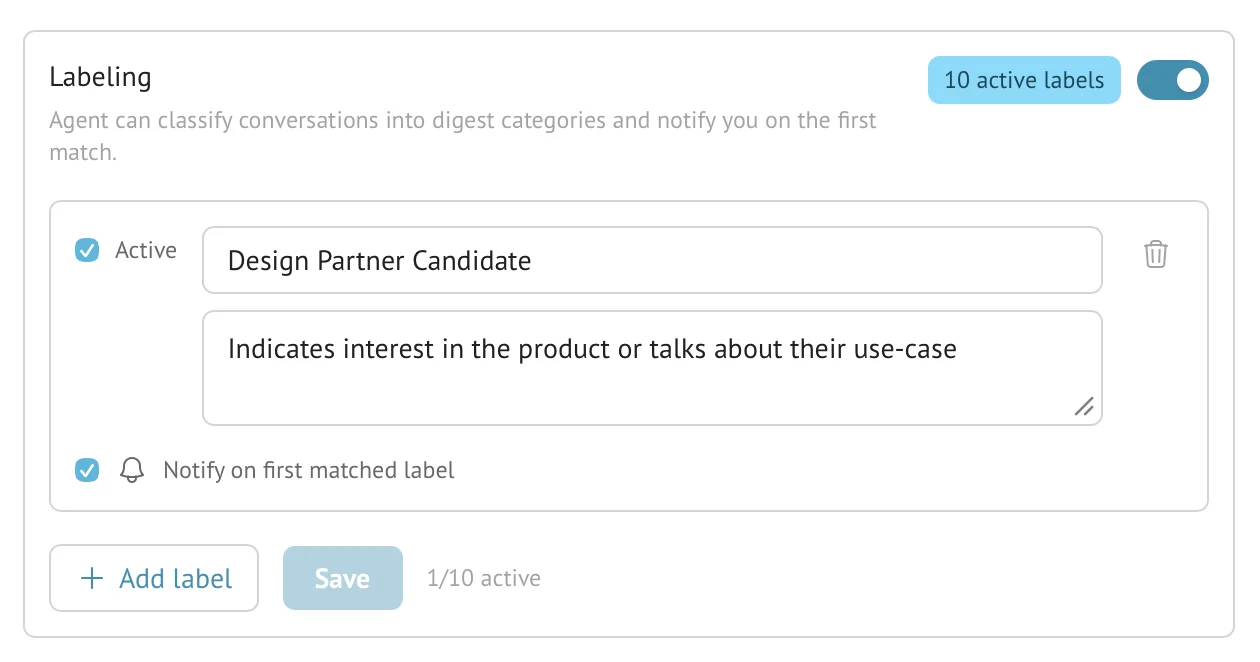
Stand Labeling settings showing an active Design Partner Candidate label with a notification-on-match option.
Figure 3-1. A label is a judgment rule. The name, description, Active state, and Notify on first matched label setting define whether the signal is reviewed later or interrupts someone now.

Example

High-intent buyer

Situation
The visitor asks about pricing, timing, implementation, contract terms, or how to start.
Move
Notify the agent owner so they can review context and offer to join.
Insight
Buying intent is often phrased as a practical constraint, not "I want to buy."

Example

Confused evaluator

Situation
The visitor asks what Stand replaces, compares it with support tools, or misunderstands the AI stand-in model.
Move
Save the label for review and notify a founder only if confusion repeats on an important page.
Insight
Repeated confusion is page copy feedback, not merely a chat-routing problem.

Writing labels

02

Give the stand-in examples and boundaries.

A label prompt should say when to apply the label and when not to. This matters because many conversations contain mixed signals. A pricing question from a student is not the same as pricing from a buyer with a rollout deadline.

Keep labels narrow. Three precise labels are more useful than ten vague ones, especially while you are still learning which conversations deserve interruption.

Label prompt

Competitor comparison

Apply when
The visitor compares Stand with Intercom, Tidio, Crisp, Chatbase, Drift, LiveChat, tawk.to, or a custom-built chat.
Look for
Questions about AI coverage, human takeover, pricing, free plans, setup effort, or whether Stand replaces a support suite.
Do not apply when
The visitor only asks a generic "what does this cost?" question without comparing alternatives.
Notify?
Yes, if the visitor has a live project, existing tool, budget concern, or migration question.

Operations

03

Separate "notify me now" from "teach me later."

Notification fatigue is a design failure. Use notifications for moments where a real person might join while the visitor is still there. Use log-only labels for trends that belong in a digest or weekly review.

This split lets Stand serve both live action and long-term learning without turning every match into an interruption.

Notification-worthy labels

  • A human can add value inside the current conversation.
  • The visitor is still in decision or problem-solving mode.
  • The rep can understand the context from the label summary and transcript.
  • The label should not fire constantly on normal questions.
SignalBuyer with timing
Notify nowYes, if a rep can help before the visitor leaves.
Review laterReview the transcript for objections and next-step language.
SignalRepeated confusion
Notify nowOnly if the visitor is on a high-intent page.
Review laterUse the pattern to rewrite page copy or the stand-in prompt.
SignalUnexpected use case
Notify nowUsually no, unless the visitor wants to talk now.
Review laterCollect examples for positioning and product discovery.
SignalCompetitor comparison
Notify nowYes, when the visitor has a live project or migration question.
Review laterTrack which alternatives appear before buying intent.

Questions

Common reader notes

Does a label automatically put a human into the chat?

No. A notified rep can review the context and choose whether to offer to join. The visitor meets the rep only after the stand-in asks and the visitor agrees.

Where do label matches show up?

Label matches can appear on active AI session cards, in history filters, and in AI digest summaries when enabled.

Try the guide on one real page.