Chapter 05

Capture leads in context.

Stand should not turn the first message into a form. It should help first, then ask for contact details when the visitor has a reason to continue the conversation later.

Stand Guidebook

Chapter 05 of 12

Field guide

What to learn in this chapter

Capture contact details after they become useful, teach the Stand-in why each field matters, and follow up from the original conversation context.

Need an exact capability definition, plan requirement, or limitation? Browse the Feature Reference.

Timing

01

Earn the ask before asking.

A premature form says, "Give us your information before we help." A better invitation is, "Here is the useful answer. If you would like someone from the team to follow up, what email should they use?"

This is especially important for expert-led businesses, consulting, real estate, agencies, and early SaaS. The visitor may not be ready to buy, but they may be ready to keep talking.

Example

Consulting inquiry

Situation
A visitor describes a messy internal workflow and asks whether you handle that kind of project.
Move
Answer the fit question first, then ask for email if they want a short follow-up or intro call.
Insight
The transcript gives the consultant a better first reply than a bare contact form ever would.

Example

SaaS pricing question

Situation
A founder asks whether Pro is enough or whether Business is needed for docs-trained Stand-ins.
Move
Explain the difference, then ask for email if they want help deciding based on their docs volume.
Insight
The lead is not just the email. The lead is the question plus the constraint behind it.

Instructions

02

Teach the Stand-in the reason for each field.

Do not tell the Stand-in to "capture leads" and leave it there. Explain when a name helps, when email helps, when phone is appropriate, and when contact collection would feel pushy.

Open Stand-ins → the chosen Stand-in → Edit → Skills → Follow-up. The skill is enabled by default. Set When to offer a follow-up and Contact request recipient, then Save. Leave the recipient blank to use the Stand-in owner’s account email; this setting does not change digest delivery.

Phone should usually be asked later than email, and only when a call is clearly useful or the visitor offers it. Tell the Stand-in to record a request, without promising a response time your team has not agreed to meet.
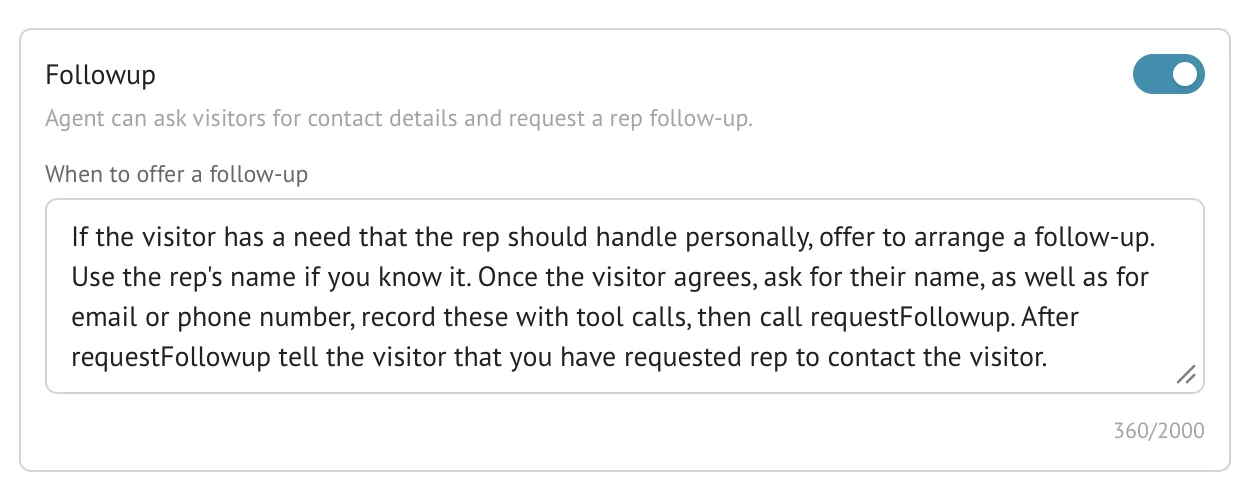
Stand Follow-up settings showing instructions for when the Stand-in should offer a rep follow-up and collect contact details.
Figure 5-1. The Follow-up skill should explain the situation that justifies contact collection, not merely list the fields to capture.

Prompt snippet

Contact capture guidance

Name
Ask once the visitor has shared a real situation or wants a personal follow-up.
Email
Ask when the visitor wants a team member to send information, continue later, or arrange a demo.
Phone
Ask only when a callback is clearly useful, such as brokerage, real estate, urgent service, or the visitor offers it.
Follow-up flag
Use when the visitor wants a call, demo, quote, human reply, or explicit next step.

Follow-up

03

Follow up with the conversation, not just the contact.

A captured email is only useful if the rep knows why the visitor gave it. Stand stores the transcript, contact details, and follow-up state together. When a requested follow-up conversation closes, Stand emails the request and transcript to the configured recipient. The team then contacts the visitor using its normal email or phone tools; the Follow-up skill does not itself send a visitor email or book a meeting.

Use history filters for "has email," "has phone," or "any contact" to find leads without reading every conversation from scratch.

Practice

Try this next

  1. 01Run a chat from the published website with a follow-up request and a test contact address, end the chat, and verify the configured recipient receives the request.
  2. 02Reply with the visitor question in the first sentence.
  3. 03Turn repeated lead questions into better page copy or a stronger Stand-in prompt.
  4. 04Track which pages capture contacts naturally and which only create idle chats.

Follow-up note

Reply with evidence, not a template

Weak first line
Thanks for reaching out. Would you like to schedule a call?
Better first line
You asked whether Business is needed for docs-trained Stand-ins; based on the docs volume you described, I would start by checking how many pages need source-backed answers.
Why it works
The reply proves the rep read the conversation and continues the decision the visitor was already trying to make.

Questions

Common reader notes

Can Stand email me when a visitor wants follow-up?

Yes. For a recorded follow-up request, Stand sends the transcript and captured contact details after the chat closes. Set Contact request recipient in the Stand-in’s Follow-up skill, or leave it blank to use its owner’s account email.

Can I find leads later?

Yes. History filters include contact presence such as has email, has phone, and any contact.

Try the guide on one real page.