The visitor should feel they reached a real person or that person's transparent Stand-in, not an anonymous queue. Identity is not decoration. It is part of trust.
Build a recognizable, trustworthy chat identity with transparent names and avatars, optimized animation, restrained pins, and the right branding level.
Need an exact capability definition, plan requirement, or limitation? Browse the Feature Reference.
Trust
01
Personal does not mean deceptive.
Stand works because the human relationship stays visible. The Stand-in can have a name, avatar, and tone, but the visitor should still see that it is AI.
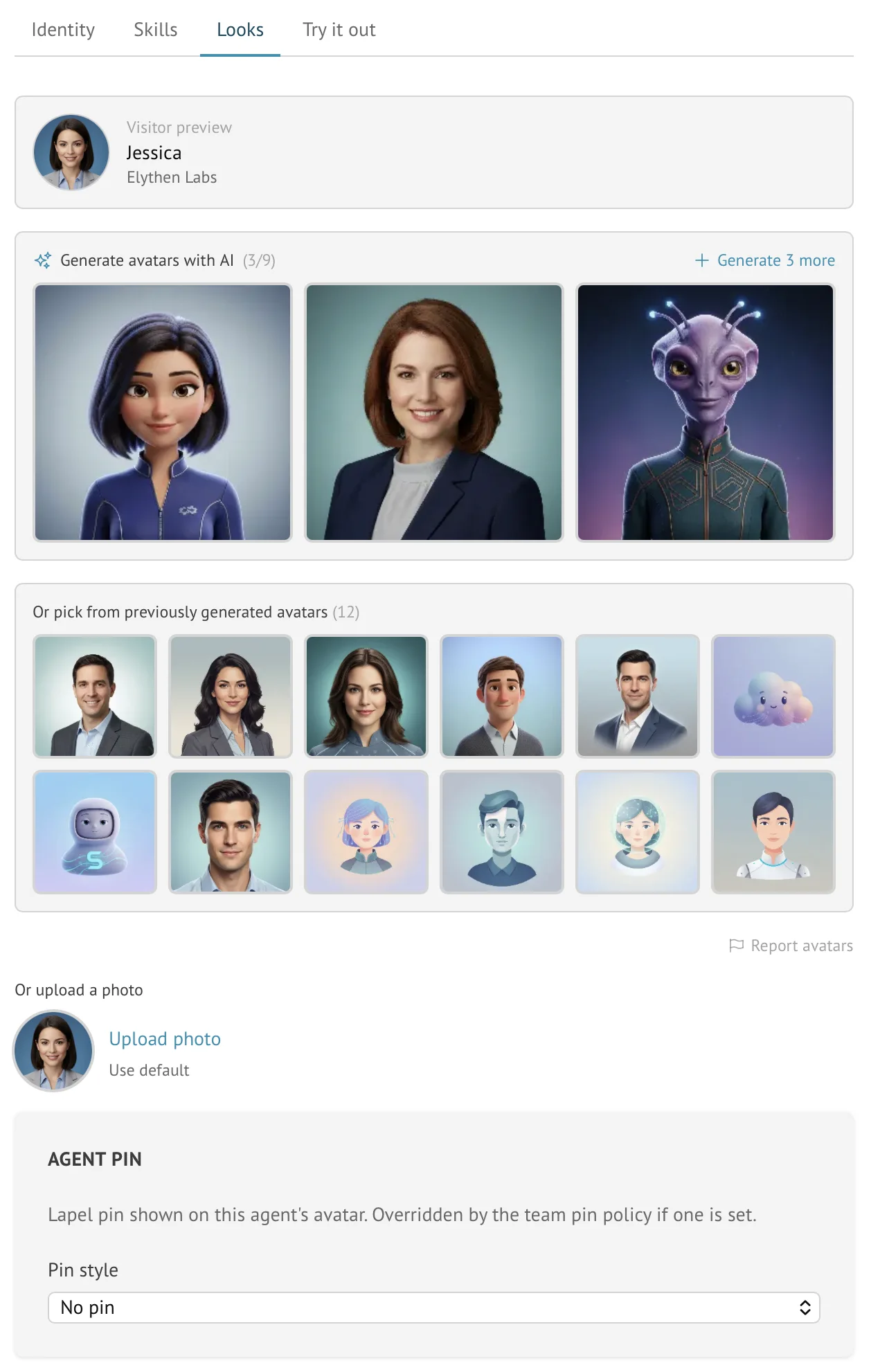
Start in Profile for the human name, title, and avatar. For a Stand-in, open Stand-ins → Edit: Identity controls its display name and greeting, and Looks controls its avatar and pin. Save and inspect the visitor preview, then check a live chat. Stand supplies the AI disclosure; branding choices do not remove it.
Figure 9-1. The Looks tab is where identity becomes visible: preview the visitor-facing name and avatar, generate or upload a face, and decide whether a Stand-in pin belongs in the header.
Example
Solo consultant
Situation
The visitor came to reach a specific expert, not a support department.
Move
Use the consultant name and headshot for live chat, and a Stand-in identity that clearly represents that consultant when unavailable.
Insight
The personal promise is the product. Preserve it.
Example
Agency team
Situation
Several specialists cover different client sites, but the agency wants a consistent brand feel.
Move
Use specialist avatars and a shared agency lapel pin set by team policy.
Insight
A small visual policy can create consistency without flattening every rep into a generic queue.
Advanced avatars
02
Optimize animation before you upload it.
A static image is the simplest starting point and uses Stand’s crop-and-optimize flow. The rest of this section is for readers comfortable preparing animation files and using command-line image tools.
Stand accepts animated GIF and WebP avatars as an advanced option. The file is stored and served exactly as you supply it so its palette, timing, transparency, disposal, and looping behavior stay intact. Stand does not show the crop tool, resize the canvas, or re-encode an animated avatar.
That also makes visitor performance your responsibility. The launcher is 60 CSS pixels and the largest visitor-facing avatar is 64 CSS pixels, so 128×128 is the right target for high-density screens. A 256×256 animation is accepted for unusual cases, but sends four times as many pixels per full frame as 128×128 without improving the normal widget view.
Stand checks the file structure in the browser and again on the server. A rejected upload explains the failed requirement. Fix the source file and upload it again; converting it to a static image keeps the normal crop-and-optimize flow.
Before upload
Crop the source to a square and resize it to 128×128 unless you have a specific reason not to.
Keep it under 100 KiB when possible and never over 256 KiB.
Keep the loop at 10 seconds or less, with no more than 300 frames.
Keep every frame delay at 30 ms or longer.
Preview the final file in a browser; Stand will not alter it after upload.
Crop the source to a square before this step. Adjust --lossy if needed, then confirm the result stays under 256 KiB and each frame lasts at least 3 centiseconds.
gif2webp and webpmux are part of libwebp. Mixed compression lets the encoder choose lossy or lossless frame by frame while -min_size prioritizes transfer size.
Requirement
GIF
Animated WebP
RequirementCanvas
GIFSquare; 64×64 minimum, 128×128 recommended, 256×256 maximum
Animated WebPSquare; 64×64 minimum, 128×128 recommended, 256×256 maximum
RequirementFile size
GIFUnder 100 KiB recommended; 256 KiB maximum
Animated WebPUnder 100 KiB recommended; 256 KiB maximum
RequirementFrames
GIF2–300 image frames
Animated WebP1–300 ANMF frames in an animation container
RequirementDuration
GIF10 seconds maximum per loop
Animated WebP10 seconds maximum per loop
RequirementFrame timing
GIFAt least 3 centiseconds (30 ms) per frame; about 33 fps maximum
Animated WebPAt least 30 ms per frame; about 33 fps maximum
RequirementStructure
GIFGIF87a or GIF89a; every image rectangle must stay inside the logical canvas
Animated WebPRIFF/WEBP with the VP8X animation flag, one ANIM chunk, valid ANMF chunks, and frame rectangles and payloads that match the canvas
RequirementProcessing
GIFPassed through unchanged; no crop, resize, or re-encoding
Animated WebPPassed through unchanged; no crop, resize, or re-encoding
Pins and policy
03
Use lapel pins as a brand accent, not a billboard.
A lapel pin is intentionally small. It can carry a logo, color, initial, or mark beside the rep or Stand-in name. Use it to signal continuity, not to turn the chat header into an ad.
Edit a personal pin in Profile → My pin preference, or a Stand-in pin in its Looks tab. The owner can set Team → Team pin policy to enforce a shared pin or no pin. While that policy is active it takes precedence over individual choices; removing it restores those choices.
Choice
Best for
Tradeoff
ChoiceRep pin
Best forSolo experts and individual sellers
TradeoffLess consistent across a team
ChoiceStand-in pin
Best forSpecialist Stand-ins or campaign-specific identities
TradeoffNeeds maintenance when Stand-ins multiply
ChoiceTeam pin policy
Best forAgencies, brands, and teams with visual rules
TradeoffOverrides individual choices while active
ChoiceNo pin
Best forVery minimal or highly personal sites
TradeoffLess brand continuity in the header
Paid polish
04
Remove Stand branding when the widget becomes part of your experience.
Base includes a small "Powered by Stand" footer. Eligible Pro and Business subscriptions remove it automatically when the widget receives the updated plan configuration; some trials or promotional access retain it. That matters when the chat experience should feel fully native to your brand or client site.
Do not wait for perfect branding before learning from conversations. Start with clear identity, then polish once the page proves value.
Good enough to launch
The rep display name is recognizable.
The Stand-in identity is clear and transparent.
The greeting matches the page.
The avatar and pin do not create confusion about who is speaking.
The powered-by footer choice matches your plan and brand expectations.
Questions
Common reader notes
Can I remove the Powered by Stand footer?
Eligible Pro and Business subscriptions remove it automatically. Some trials or promotional access retain it; check the plan view if the footer remains. The AI badge stays visible.
Can teams enforce one pin across the organization?
Yes. Owners can set a team pin policy that overrides rep and Stand-in pins while active.
Can an avatar be animated?
Yes. Advanced users can upload an optimized animated GIF or WebP that meets the limits in this chapter. Stand passes it through unchanged instead of cropping or re-encoding it.