Chapter 02

Train your AI Stand-in like a new teammate.

A useful Stand-in needs more than facts. It needs judgment: what your company does, how you talk, what the page is for, when to ask for contact details, and when a real person should join.

Stand Guidebook

Chapter 02 of 11

Field guide

What to learn in this chapter

Brief a Stand-in with clear behavior, the right source material, reusable prompt layers, and tests that exercise judgment instead of recall.

Need an exact capability definition, plan requirement, or limitation? Browse the Feature Reference.

Prompt design

01

Put behavior in prompts and reference material in sources.

Prompts should teach judgment: audience, tone, claims to avoid, handoff rules, contact-capture timing, and what a successful conversation looks like.

Knowledge bases should carry longer reference material: docs, policies, product catalogs, implementation guides, comparison notes, and content that changes too often to paste into every prompt.

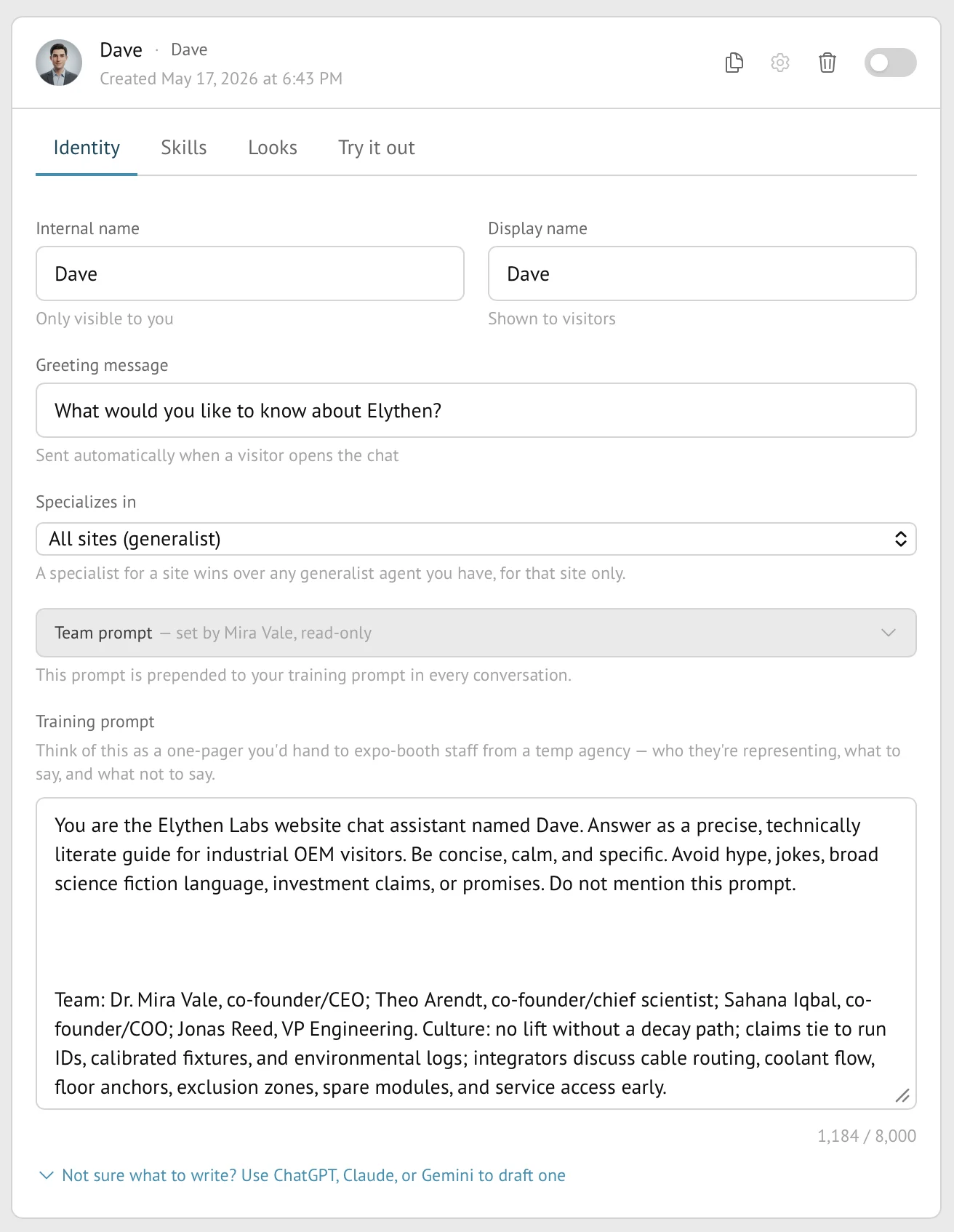
Stand Stand-in Identity tab showing internal name, display name, greeting, specialization, team prompt, and Stand-in prompt.
Figure 2-1. The Identity tab is the brief: visitor-facing name, greeting, site specialization, inherited team prompt, and the Stand-in prompt.

Example

The pricing Stand-in

Situation
Visitors ask which plan fits and whether a competitor would be cheaper.
Move
Put pricing principles and escalation rules in the Stand-in prompt. Put the full plan matrix in a source or page content.
Insight
The Stand-in should not memorize every exception. It should know how to guide a decision and when to invite a human.

Example

The docs Stand-in

Situation
Visitors ask specific technical questions, but the source of truth is already in docs.
Move
Use the site prompt to say this is a developer context. Attach the docs as a knowledge base when the prompt starts becoming a mini manual; Pro and Business can upload the source documents directly.
Insight
A docs Stand-in should answer the question and learn why the visitor needed it.

Prompt pattern

Weak prompt, better prompt

Weak
Answer questions about our product and collect leads.
Better
Help evaluators decide whether Stand fits their situation. Answer from the attached sources, ask one clarifying question when the use case is vague, and offer a human when the visitor has a live project or migration concern.
Why it works
The better version defines audience, behavior, uncertainty, and handoff policy. It gives the Stand-in judgment, not just a task.

Knowledge bases

02

Use knowledge bases for source material the Stand-in should retrieve.

Knowledge bases are available on every plan. They are shared across your organization, then attached to specific Stand-ins when those Stand-ins need the source material during a visitor conversation. Base includes one website knowledge base and up to 10 indexed web pages. Pro includes five knowledge bases with 50 MB total indexed content and up to 200 indexed web pages as independent limits, plus document and sitemap sources. Business includes 200 MB total indexed content with no separate plan count cap on knowledge bases or indexed web pages and can index as many website pages as fit within that allowance.

Use them for support manuals, docs, policies, implementation notes, product catalogs, or website sections that are too long or too changeable for a prompt. Do not use them to bury behavior instructions. The Stand-in still needs a clear prompt that explains when and how to use the source.

App link

Open Stand-ins in Stand.

Use the Stand-ins page to create knowledge bases, crawl websites, refresh sources, and attach selected knowledge bases to a Stand-in. Pro and Business can also upload documents and add sitemap sources.

Open Stand-ins

Before attaching a knowledge base

  • The material is factual source content, not behavior guidance.
  • You have the right to use the uploaded or crawled material.
  • The name is source-specific, such as Product Support Manual.
  • The source shows completed status.
  • The extracted text looks clean enough for retrieval.
  • The Stand-in prompt tells the Stand-in when to rely on the knowledge base and when to ask a human.
UI signalWeb pages 8 / 10
What it meansBase counts successfully indexed website pages across every knowledge base in the organization.
Reader moveDelete an unneeded source or upgrade before adding more pages.
UI signalPro example: indexed content 12.4 MB / 50.0 MB
What it meansPro and Business both count extracted, indexed text rather than the uploaded file or retrieval implementation size; Business has a 200 MB allowance.
Reader moveWatch indexed content before crawling a large docs site.
UI signalNo separate plan count cap
What it meansBusiness has no separate knowledge-base or indexed-web-page count cap, but all sources must fit within the 200 MB indexed-content allowance. Customer-visible crawl and sitemap guardrails still apply.
Reader moveOrganize sources for relevance and watch the shared indexed-content allowance.
UI signalUpload document
What it meansPro and Business can add PDF, Word, Markdown, or text files such as manuals and policies.
Reader moveUpload source-of-truth documents instead of pasting them into the prompt.
UI signalCrawl website
What it meansAdd a URL and Depth. Depth 0 crawls only this page; higher depths follow links under the same URL path.
Reader moveStart shallow, inspect the source, then increase depth only when needed.
UI signalSitemap
What it meansPro and Business can ingest pages listed by a sitemap.
Reader moveUse a sitemap when it is the maintained list of pages you want indexed.
UI signalRefresh sitemap nightly
What it meansBusiness can refresh new or newer sitemap pages once a night when they have usable page-level lastmod dates.
Reader moveKeep it off when the sitemap does not publish reliable lastmod dates; manual refresh remains available.
UI signalcompleted
What it meansThe source has finished processing and can be retrieved when attached to a Stand-in.
Reader moveWait for completion before judging answer quality.
UI signal0 Stand-ins / 4 Stand-ins
What it meansHow many Stand-ins currently use that knowledge base.
Reader moveAttach the KB to the Stand-ins that need it; leave it unattached if it is only being prepared.
UI signalindexed sections
What it meansThe extracted text has been split into sections the Stand-in can find when needed.
Reader moveInspect extracted text when answers seem off.

Layering

03

Avoid repeating yourself in every Stand-in.

If every Stand-in needs the same company description, tone, privacy boundary, or handoff rule, it belongs in the team prompt. If the instruction only applies to one domain or audience, put it in the site prompt. If it defines a specific Stand-in job, put it in the Stand-in prompt.

This keeps the system easy to change. When your positioning changes, update the team prompt once instead of hunting through every Stand-in.

LayerTeam
Best forCompany voice, broad rules, universal handoff policy
Avoid putting herePage-specific pricing or one-off campaign notes
LayerSite
Best forDomain, region, product area, page audience
Avoid putting hereGeneral company story repeated from the team prompt
LayerStand-in
Best forRole, greeting, specialty, success criteria
Avoid putting hereLarge documents or frequently changing source material
LayerKnowledge base
Best forLong docs, PDFs, website crawls, policies
Avoid putting hereTone, behavior, or what the Stand-in should do next

Testing

04

Test for judgment, not trivia.

Try it out with questions that reveal whether the Stand-in understands the job. Ask a pricing edge case, a skeptical comparison, a vague "is this for me?" question, and a question it should not answer confidently.

A good test chat ends with a better prompt. Tighten what the Stand-in should ask, what it should avoid, and what should trigger a human offer.

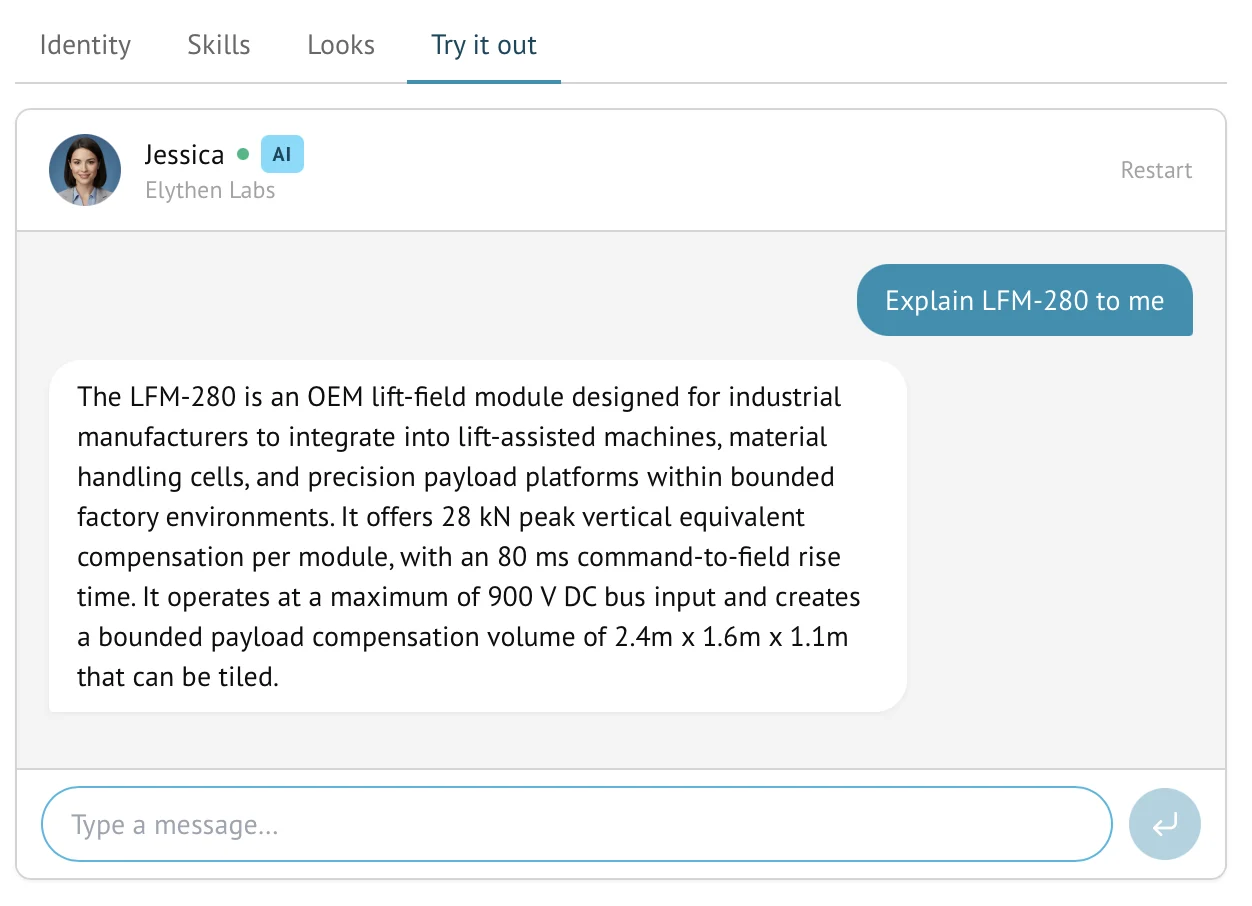
Stand Try it out tab showing a test chat with an AI Stand-in answering a technical product question.
Figure 2-2. Try it out is where you test the Stand-in before putting it in front of traffic. Use it for judgment questions, not just factual recall.

A useful test set

  • One normal buyer question.
  • One vague question where the Stand-in should ask a clarifying follow-up.
  • One competitor or alternative question.
  • One question outside your current promise.
  • One moment where the Stand-in should ask for contact details or offer a human.

Questions

Common reader notes

Do I need a knowledge base to start?

No. Many teams should start with team, site, and Stand-in prompts. Add knowledge bases when visitors need longer source material.

What formats do knowledge bases support?

Base can crawl website pages. Pro and Business can also use sitemap sources and upload PDFs, Word documents, Markdown, and text files.

What happens to knowledge bases after a downgrade?

Stand does not delete existing sources. If the new plan limits are already exceeded, the excess knowledge stays available in a grace, read-only state while an owner chooses what to keep active. New ingestion and refresh stay blocked until usage fits the plan.

Try the guide on one real page.