Stand-in skills
Custom conversation signals
Custom conversation signals let an organization define the kinds of customer evidence a Stand-in should recognize. A matched signal adds a searchable label with supporting context and can alert the Stand-in owner on the first match.
- Availability
- Pro and Business
- Configured in
- Dashboard → Stand-ins → select a Stand-in → Edit → Skills → Labeling
- Category
- Stand-in skills
- Reference status
- Current
Before you begin
Plan availability: Pro supports up to 3 active signals per Stand-in; Business supports up to 10.
Prerequisite: A Pro or Business organization, a saved Stand-in, the Labeling skill enabled, and at least one complete active signal.
Key boundary: Signals classify conversation evidence; they do not change routing, authenticate a visitor, guarantee the classification is correct, or notify repeatedly for every message that matches the same signal.
Define a signal
| Field | Behavior |
|---|---|
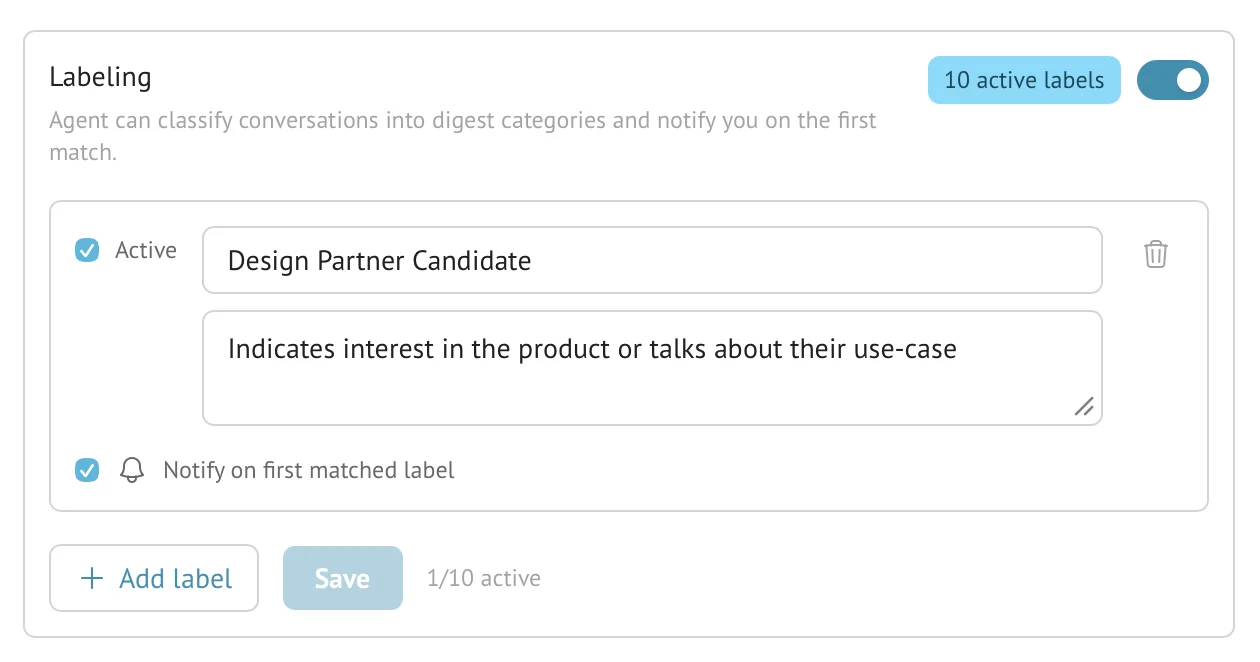
| Active | Includes this signal in live Stand-in classification. An inactive row can remain saved without consuming the active limit. |
| Name | The customer-facing label name shown in Chats, History, and digest evidence. Names are limited to 80 characters. |
| How to recognize this conversation | Up to 500 characters describing the evidence, examples, and boundary the classifier should use. |
| Notify on first matched label | Sends one owner alert when the signal first matches in a conversation. |
Active-signal plan limits
The limit counts active signals, not every saved row. Deactivate a signal before activating another when the Stand-in is at its plan limit.
| Plan | Active custom signals per Stand-in |
|---|---|
| Base | Unavailable; saved paid-plan labeling remains disabled under the current plan. |
| Pro | Up to 3 active signals. |
| Business | Up to 10 active signals. |
What happens on a match
- The AI conversation pipeline evaluates supported conversation evidence against the Stand-in’s active definitions.
- A first match adds the configured label and evidence summary to the session without posting a visitor-visible message.
- The label becomes visible in the live monitoring view and remains with the completed conversation in History.
- If Notify is enabled, the Stand-in owner receives the configured first-match alert. Later matching messages do not create repeated first-match alerts for that label.
- Digest analysis can group and cite matching conversations when the organization has the corresponding AI insight capability.
Test a signal definition
After saving the Labeling settings, start controlled conversations from the installed website: one clear match, one near miss, and one match expressed in different words. Inspect applied labels in Chats and, after closing, in History. Test the owner’s notification separately. Try it out has no label-results inspector and its conversations are not saved in History.
A useful definition describes observable conversation evidence and exclusions. Broad topics such as “pricing” tend to create noisy labels; a concrete signal such as “visitor is blocked by a procurement requirement” gives the classifier a testable boundary.
Difference from Product Discovery
- A custom signal classifies evidence; it does not initiate a consent-based research interview.
- Product Discovery has its own built-in label, research fields, consent rules, and adaptive interview behavior.
- The built-in Product Discovery label does not consume the custom-signal active limit.
- A conversation can contain both a Product Discovery finding and one or more custom signal labels when their independent conditions are met.
Limits and boundaries
- Signal labels are AI classifications and should be reviewed against their cited conversation evidence.
- Disabling the skill stops future matching; it does not erase labels already retained with completed conversations.
- Changing a definition affects future evaluation and does not retroactively relabel all retained History.
- Signal notifications require a working browser or push notification channel and do not make the owner eligible for live routing.
Example
The screen below shows the feature in its normal Stand context. Labels and surrounding controls may vary with account state and plan.