Knowledge bases
Managing and inspecting knowledge sources
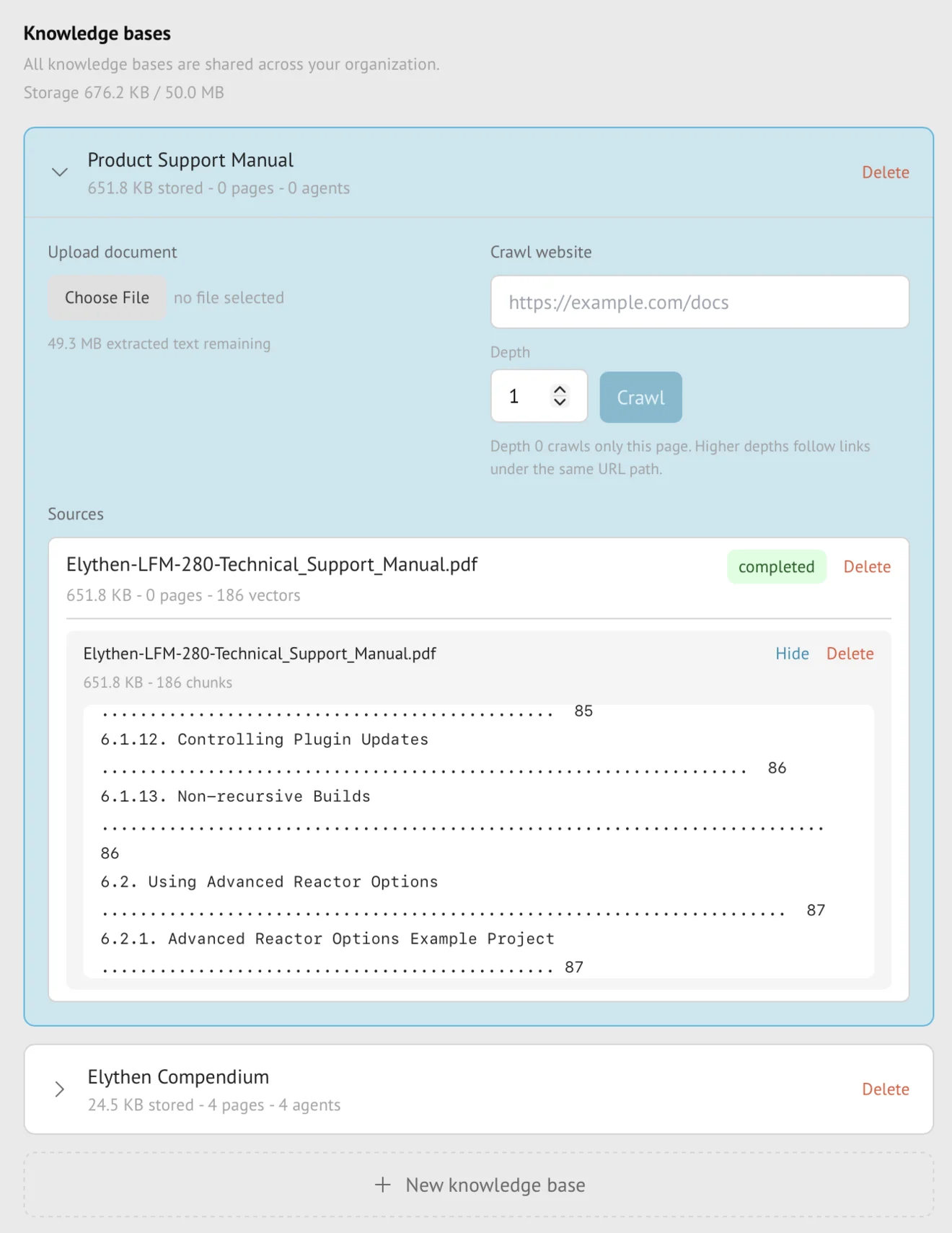
The knowledge-base view shows each source’s progress, indexed text, usage, and last refresh. Members can inspect shared sources; the member who owns a knowledge base can change its sources, cancel ingestion, or delete it.
- Availability
- All plans
- Configured in
- Dashboard → Stand-ins → Knowledge bases → expand a knowledge base → Sources
- Category
- Knowledge bases
- Reference status
- Current
Before you begin
Plan availability: All plans for source types and inspection surfaces available to the current plan.
Prerequisite: Organization membership to view shared knowledge; ownership of the knowledge base to change its sources.
Key boundary: Inspection shows extracted and indexed text, not a pixel-perfect copy of the original page or document and not a simulation of every passage the model might retrieve for every question.
Knowledge hierarchy
| Level | What it represents |
|---|---|
| Knowledge base | An organization-visible container with a description, owning rep, sources, and Stand-in attachments. |
| Source or document | One website crawl, sitemap, uploaded document, or replacement lifecycle inside the knowledge base. |
| Task | The active or completed ingestion, refresh, replacement, or cancellation work for that source. |
| Indexed section | A searchable unit of extracted text retained with source title, URL or filename, and section context. |
What can be inspected
- Source type, URL or filename, task and source status, last refresh, and customer-visible usage.
- Status badges use a static clock for queued work, an activity indicator while ingestion is running, and static semantic icons for completed, failed, or cancelled work.
- Successfully indexed pages or documents and their extracted text.
- Indexed sections with retained structural context.
- Search within a document’s indexed sections to confirm that an expected phrase or topic was extracted.
- Failure and active-ingestion state needed to decide whether to refresh, upload a revised document, cancel, or preserve the current source.
Owner actions
| Action | Effect |
|---|---|
| Re-crawl or Re-ingest | Refreshes a website or sitemap source while retaining its prior successful version until success. Uploaded files use Upload document followed by deletion of the outdated source. |
| Cancel ingestion | Stops supported active work without promoting incomplete content. |
| Delete source or document | Removes that owned source and its indexed material from future knowledge use. |
| Delete knowledge base | Removes the owned container and its sources and eliminates its future Stand-in attachment use after confirmation. |
Visibility, ownership, and downgrade state
- Knowledge bases are visible across the organization but retain one owning rep.
- Non-owning members can inspect shared knowledge and select available bases for their Stand-ins within plan limits.
- Only the owner can change or delete the knowledge base and its sources.
- Member removal can transfer knowledge ownership so shared resources are not orphaned.
- After downgrade, over-limit knowledge remains visible in grace or read-only state; ingestion and refresh pause until usage fits the current entitlement.
Interpretation boundaries
- Successful extraction proves that text was indexed, not that the source is accurate or current.
- In-document search checks indexed content; it is not the same ranking process used for a particular AI question.
- Deleting a source changes future retrieval and does not rewrite messages already generated from earlier knowledge.
- The visitor never receives the private inspection interface or raw indexed sections as hidden system messages.
Example
The screen below shows the feature in its normal Stand context. Labels and surrounding controls may vary with account state and plan.