Developer integration
Stand chatbox
The stand-chatbox web component starts a complete Stand conversation inside the host page, with the supplied messaging engine, customizable surfaces, capped or continuously growing height, and an optional floating panel after engagement.
- Availability
- All plans
- Configured in
- Website HTML → <stand-chatbox> after the Stand embed script
- Category
- Developer integration
- Reference status
- Current
Before you begin
Plan availability: All plans; configured skills, normal chat quotas, and plan entitlements apply.
Prerequisite: The Stand installation script, an enabled matching Site with eligible coverage, and permission to edit the page HTML and CSS.
Key boundary: The element customizes the supplied conversation layout. It is not a headless SDK or a replacement renderer for arbitrary canvas, game, or spatial interfaces. Visitor messages remain text-only.
What the element renders
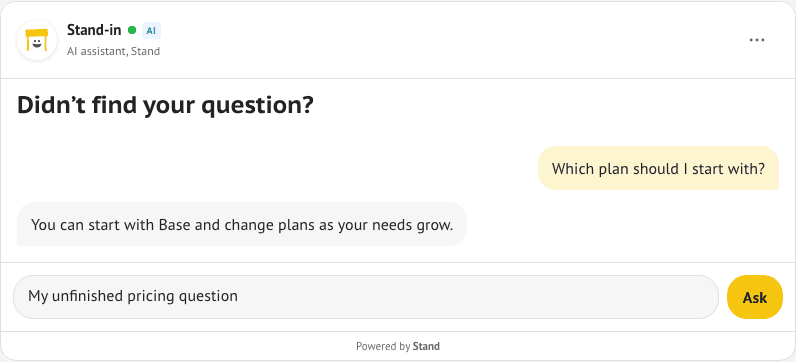
stand-chatbox places the conversation itself in normal page flow. Its fresh default shows authored intro HTML and the composer. The responder header appears after the first accepted question or authenticated active-conversation restoration; show-header opts into displaying it from the outset. Stand button and Stand card remain invitations that open a conversation.
An expanded floating panel always shows its header and controls. Starting a new chat or abandoning an invalid saved session returns to the compact initial state unless show-header is present. The chatbox does not inherit a discovery greeting; an explicit greeting attribute or greeting passed to openChat supplies one. Configured sensitive-data notices and authored footer content remain available in the compact state.
It reuses the supplied widget’s conversation engine and message rendering: text and supported Markdown, streamed replies, typing indicators, link and system cards, live-human identity changes and handoff, follow-up forms, localized controls, error recovery, and end/new-chat actions. Site configuration and responder skills determine which features appear.
A fresh element stays hidden while loading, unavailable, or excluded by its show-when filter. It creates a new session only when the visitor sends the first message, and does not focus the composer on page load. An authenticated active conversation remains accessible even when new-session coverage is unavailable.
<stand-chatbox
  hidden
  id="pricing-help"
  prompt="The visitor is comparing plans. Answer pricing questions directly."
  placeholder="Ask about pricing"
  send-label="Ask"
  max-height="560px"
  analytics-id="pricing-help"
>
  <h2 slot="intro" style="padding:10px 16px;margin:0;font-size:20px;font-weight:700;line-height:1.3">Didn’t find your question?</h2>
</stand-chatbox>
Install stand.js once on the page. No authored input, click handler, or additional chat client is required.
Capped and growing height
In capped mode, the box adapts to the visible viewport while its composer is focused. Growing mode keeps its page-flow layout. An expanded floating panel is always viewport-capped, even if its inline height mode is grow. Place either inline mode in an ancestor that allows its chosen size, and test the host layout with the on-screen keyboard.
| Mode | Behavior |
|---|---|
Default or height-mode="capped" | The box grows with its content up to 560px. Longer transcripts scroll within the box while the composer remains available. |
max-height="640px" | Sets a different CSS length or expression as the cap. The attribute takes precedence over the CSS variable. |
--stand-chatbox-max-height | Changes the default cap from page CSS when the attribute is omitted. |
height-mode="grow" | Removes the transcript cap so incoming messages extend the page. The host page scrolls through the conversation. |
Optional floating conversation
Add the boolean floating attribute to begin with the composer in the page and open the same conversation in a floating panel on the first accepted send. An explicit openChat() or expand() also expands it. Loading the page or adding the attribute does not create a session.
With floating enabled and a submitted question or authenticated conversation, minimize, Escape, or collapse() preserves the conversation and draft and returns the same transcript to the page for browsing, with the reply composer hidden. A compact localized Chat control with an expand arrow sits to the right of the header’s options menu. Its accessible name is Chat: Continue conversation, or Chat: Jatka keskustelua in Finnish, with an unread-message announcement when needed. Clicking or tapping a noninteractive part of the collapsed card also resumes; scrolling, text selection, links, and buttons keep their normal behavior. Resume and expand() do not focus the message input. An already-focused composer retains focus during the first-send transition.
Minimizing a manually expanded fresh box before submitting a question returns to the compact inline composer with its draft. Start a new chat also returns to the fresh inline composer and focuses it as an explicit visitor action.
Independent chatboxes do not add a corner control. A shared chatbox can also resume through its corner avatar. While the collapsed header’s resume control fits fully inside the visible viewport, the duplicate shared corner control stays hidden. When it no longer fits fully, the corner control returns under the page’s reveal and hide settings. Normal shared inline mode keeps its corner control under those settings.
The collapsed transcript keeps its header, introductory content, and footer and follows the normal inline height mode: capped with internal scrolling, or growing with the page. Incoming replies update it without reopening the floating panel or pulling a visitor away from older messages; the new-message control remains available.
A saved active floating conversation restores collapsed after reload. If it has expired, ended, or is rejected during restoration, the box returns to a fresh inline composer on that first visit when current availability and show-when permit. No additional reload is needed, and this does not create a session or focus the composer. Removing the attribute returns the same conversation inline with its composer.
- Homepage FAQAn in-page question becomes a floating conversation after sending.
- Pricing FAQThe component replies inline in its own conversation, separate from the regular corner avatar popup.
Conversation attributes
| Attribute | Behavior |
|---|---|
floating | Boolean opt-in: start inline, then expand into a floating panel on the first accepted send or explicit opening action. After submission or active-session restoration, minimize retains the session and draft and leaves the transcript browsable with its reply composer hidden. Before submission, minimize returns to the inline composer. |
show-header | Boolean opt-in to show the responder header before the first question. Without it, the header appears after an accepted question, authenticated active-session restoration, or expansion. Remove the attribute to use the compact default; a string value of "false" still counts as present. |
shared-session | Boolean opt-in to the global corner/button/card conversation; omitted means an independent conversation. Set before connecting the element. Ownership is sampled at initialization, and later changes do not move sessions. Use at most one per page; extra opted-in boxes stay hidden. |
show-when | Display filter for a fresh conversation: omitted or either matches the selected human or AI responder; rep matches a human; standin matches AI. Empty and unsupported values stay hidden. This does not select routing. |
hidden | Recommended before custom-element upgrade on the box or its closest dedicated data-stand-reveal wrapper. Stand removes one hidden attribute when the box can appear, preferring the element itself. |
greeting | Explicit visible opening message before a new conversation. Empty or omitted shows none; discovery greetings are not inherited. A greeting can be shown while the initial header stays hidden. |
prompt | Private page context for the newly created conversation; it does not become a visitor message or rewrite an existing session. |
placeholder | Changes the message field’s placeholder. |
send-label | Changes the visible send action label. |
analytics-id | Labels the placement for chat activation attribution. |
visitor-id and visitor-name | Supply private page-known identity when this box creates a session. Identity is unverified metadata, not authentication. |
id or session-key | Provides a stable identity for restoring an independent chatbox’s conversation. Session-key takes precedence over id; without either, restoration uses the page path and box order. |
aria-label | Names the chatbox’s internal conversation region for assistive technology. |
CSS variables, parts, and slots
Set variables on the element, style shadow surfaces with ::part(), and style authored slot content with ordinary CSS. The guide pairs live capped inline, floating FAQ, growing editorial, and dark hero examples with the HTML and CSS used to render them.
- Live chatbox examplesTry four independent conversations and copy the matching markup and styles.
| Surface | Names |
|---|---|
| CSS variables: shell | --stand-chatbox-max-height, --stand-chatbox-background, --stand-chatbox-color, --stand-chatbox-font-family, --stand-chatbox-font-size, --stand-chatbox-border-color, --stand-chatbox-radius, --stand-chatbox-gap, --stand-chatbox-shadow |
| CSS variables: floating panel | --stand-chatbox-floating-width (default 420px), --stand-chatbox-floating-height (default 560px), --stand-chatbox-floating-shadow. The normal max-height and visible viewport still bound its size. |
| CSS variables: surfaces | --stand-chatbox-header-background, --stand-chatbox-host-background, --stand-chatbox-host-color, --stand-chatbox-visitor-background, --stand-chatbox-visitor-color, --stand-chatbox-composer-background, --stand-chatbox-input-background, --stand-chatbox-muted-color, --stand-chatbox-accent, --stand-chatbox-accent-hover, --stand-chatbox-accent-text |
| Identity parts | chat, header, avatar (wrapper), avatar-image (built-in image), rep-name, subtitle, ai-badge |
| Transcript parts | messages, message, visitor-message, host-message, system-message, system-card, link-card |
| Rich content parts | message-link, message-paragraph, message-strong, message-emphasis, message-code, message-list, message-list-item, message-quote, system-card-text, system-card-divider, link-title, link-description, link-host |
| Follow-up and delivery parts | followup-form, followup-input, followup-submit, followup-status, message-status, retry-button |
| Controls and footer parts | composer, input, send-button, footer, powered-by, end-chat, new-chat |
| Floating controls | minimize-button; expand-button beside the collapsed header’s options menu; floating-resume for the shared chatbox’s corner avatar; inline-resume for the page placeholder while expanded |
| Slots | intro holds authored headings or other HTML before the transcript; avatar replaces the avatar visual while responder identity continues to update; header-actions adds controls. Avatar and header-action slots follow header visibility. footer adds supporting content alongside the supplied footer. |
Footer attribution
On Base, when the configuration supplies poweredByUrl, the Powered by Stand link is present in the chatbox’s shadow DOM but hidden before the first submitted question. The default footer centers it, matching the ordinary chat widget. It appears on submission, including while sending or awaiting retry, and for restored conversations with visitor messages. Starting a fresh conversation hides it again.
Eligible paid Pro and Business billing subscriptions omit the link element entirely. Temporary access or collaborator status on Base does not remove attribution. Custom content in the footer slot is independent of this timing and adds to the supplied footer.
A fresh successful availability lookup can update branding on a restored shared conversation without changing its responder, history, or connection. An unavailable lookup does not change that conversation’s branding.
- Removing Stand brandingThe billing entitlement that controls the supplied attribution.
Page interactions and send hooks
Use a before-send listener to include a visible form or comparison snapshot, or call sendMessage from a page action. The guide demonstrates a quoted snapshot like Experiment Verdict. Private prompt changes apply only when a new session is created.
| Method or event | Contract |
|---|---|
stand-chatbox-ready | Bubbles when the element is initialized, including while hidden or unavailable. It does not confirm eligibility, override show-when, or confirm successful session restoration. Starting a conversation remains gated on matching availability. |
sendMessage(text) | Sends through the built-in composer flow and returns whether that flow accepted the message; fresh sends return false while unavailable or filtered. This is not a server-delivery acknowledgement. |
endChat() | Ends the current conversation through the supplied session lifecycle. |
expand() and collapse() | Open or minimize the same conversation without ending it. Require a connected, initialized box that is either the primary shared chatbox or has floating; otherwise return false. An ordinary independent inline box stays inline. Expanding a fresh box also requires matching availability. Collapse returns false when already inline. A fresh unsent box or a primary shared box without floating collapses back to its inline composer. Successful calls return true. Explicit expansion focuses a non-input control. |
presentationState | Read-only presentation state: inline (in-page conversation and composer), expanded (floating conversation), or collapsed (browsable in-page transcript with Continue conversation controls). |
stand-chatbox-state | Bubbles after an actual presentation transition is applied, with detail.state and detail.previousState. Initial inline rendering does not emit it; restoration may emit a collapsed transition during initialization. It is not a message-delivery event. |
openChat(greeting, activation, visitorMessage, prompt, visitorIdentity) | Uses the supplied opening flow and can focus the composer on an explicit page action. A fresh unavailable or filtered box returns false. Existing sessions retain their original greeting and context. |
stand-chatbox-before-send | Cancelable event before a send. A synchronous listener can change detail.message, set detail.prompt for a new session, or call preventDefault(). The transformed text enters the ordinary retry flow. |
stand-chatbox-send | Bubbles with detail.message when the send flow accepts the text. It does not confirm server delivery or an AI reply. |
Page integrations and conversation continuity
- Each chatbox has its own conversation by default. The regular corner avatar popup, Stand buttons, Stand cards, and public
StandChat.openChat()calls continue to use the global widget conversation. Independent boxes never intercept those invitations or adopt an existing global conversation. - The boolean shared-session attribute opts into the global conversation. For a fresh global conversation, the first eligible shared box is its primary surface. Active or restored shared ownership is retained. Use at most one shared box per page; other opted-in boxes stay hidden rather than silently creating independent conversations.
- A fresh chatbox excluded by availability or show-when does not remove corner chat access. If no eligible shared box owns the global conversation, the regular avatar popup supplies it under the page’s usual reveal rules.
- A shared box and its corner avatar use one conversation, connection, and draft. Sending inline stays inline unless floating is set. The corner opens the same conversation in a floating panel; minimizing a normal shared inline box returns to its in-page composer.
- The shared corner control can appear before the first message, in either inline or collapsed presentation, according to page reveal and hide settings. It is hidden while that panel is expanded, and in collapsed floating mode while the header’s resume control fits fully inside the visible viewport. These settings do not hide authored chatboxes.
- Adding a shared box while the regular popup is already open or has a draft, active session, or pending send leaves that popup and its corner control in place; the shared box stays dormant. Set shared-session before connection: changing it after initialization does not change ownership or move credentials.
- Independent boxes keep separate conversations and do not add corner controls. Give them stable IDs or session keys for repeatable restoration. Removing one does not transfer its conversation to the regular popup.
- The supplied conversation lifecycle handles session restoration, connection recovery, pending messages, handoff, and ending the conversation.
- Removing an active shared box restores the global conversation’s regular floating presentation. An independent box restores its own conversation when that same element reconnects or its stable identity is mounted again.
Design and accessibility boundaries
- When the header is shown, preserve its responder identity and AI badge. Preserve sensitive-data notices and the supplied Powered by Stand attribution behavior. Additional footer content does not replace them.
- Preserve text contrast, visible keyboard focus, descriptive control names, and touch targets when customizing parts.
- Keep composer text at least 16px on iPhone and test both scrolling and the on-screen keyboard in the actual surrounding page.
- Literal HTML prompt and identity attributes are visible in page source. Do not put secrets in them.
- Use the custom chat UI visitor API when the product needs a different renderer or interaction model, such as a game, character, or 3D scene.
Example
This example shows one implementation of the feature. The reference above defines its supported behavior.