AI Stand-ins
AI Stand-ins
An AI Stand-in is a named AI responder that can answer website visitors when no eligible human rep takes the new chat. Each Stand-in has its own visitor-facing identity, instructions, Site and path scope, knowledge, skills, and appearance.
- Availability
- All plans
- Configured in
- Dashboard → Stand-ins
- Category
- AI Stand-ins
- Reference status
- Current
Before you begin
Plan availability: All plans.
Prerequisite: An active Stand member account; public conversations also require an enabled Stand-in and an installed, matched, enabled Site, and Stand-in coverage must be active.
Key boundary: An AI Stand-in is not the owning rep. Visitors see a clear AI indicator, and generated replies remain probabilistic rather than guaranteed statements of fact.
What an AI Stand-in is
An AI Stand-in is a reusable AI responder owned by a Stand member. It represents a configured role in website conversations rather than impersonating the member who created it. The visitor sees the Stand-in’s display name, appearance, optional brand line, greeting, and an AI badge.
An enabled Stand-in becomes a routing candidate only where its Site and path coverage match, Stand-in coverage is active, and the organization can start another chat. Stand routes new chats to an Available rep first; Stand-ins can also cover overflow when every eligible rep is at capacity.
What belongs to a Stand-in
| Area | Stand-in-specific configuration |
|---|---|
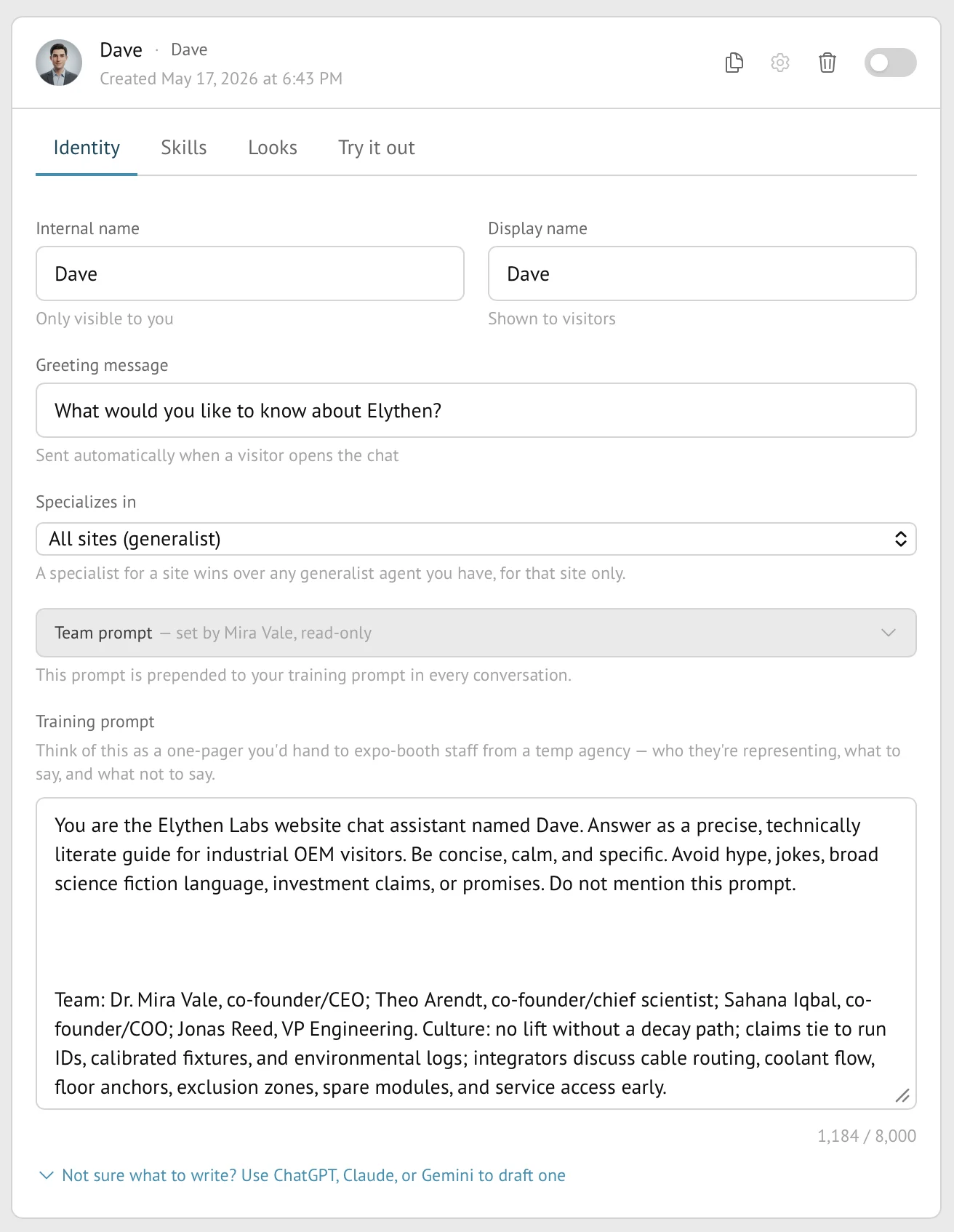
| Identity | Internal name, visitor-facing display name, optional brand line, greeting, Stand-in instructions, and optional Site or path specialization. |
| Skills | Lead capture and any enabled follow-up, Product Discovery, or custom conversation-signal behavior available to the organization. |
| Knowledge | Organization knowledge bases selected for retrieval after the Stand-in configuration is saved. |
| Looks | Generated, pooled, or uploaded avatar plus an optional lapel pin, subject to organization pin policy. |
| Routing controls | The Stand-in row’s enabled state and the member’s Stand-in coverage state determine whether it can enter public routing. |
What an enabled Stand-in can do
- Answer visitor messages using the combined Team, Site, and Stand-in instructions.
- Retrieve relevant private excerpts from attached knowledge bases without displaying those excerpts as system notes.
- Use supported skills to collect contact details, offer follow-up, conduct consent-based Product Discovery, or label configured conversation signals.
- Share supported links and a primary link card when a grounded destination is relevant.
- Continue the same transcript if a human rep monitors, offers to join, or takes over.
- End a conversation when the exchange is complete and preserve it in History under the configuration version that handled it.
What visitors and reps see
| Audience | Visible behavior |
|---|---|
| Visitor | The configured Stand-in identity and AI badge, its messages and cards, and any visitor-facing skill or handoff prompts. The owner’s private configuration is not shown. |
| Rep monitoring the chat | The live transcript, Stand-in identity, collected contacts and labels, and controls for human participation. |
| History reader | The completed conversation and the Stand-in associated with it, even when the current Stand-in has since been edited or replaced. |
Availability and prerequisites
- AI Stand-ins and human takeover are included on every Stand plan.
- The Stand-in must be enabled; newly created and cloned Stand-ins begin disabled so incomplete configuration is not published accidentally.
- Stand-in coverage must be active for an enabled Stand-in to enter public routing.
- The assigned Site must be installed, enabled, and matched to the visitor page.
- A specialized Stand-in must match both its Site and any configured path pattern.
- The organization must have included quota or chat balance available to start the conversation.
Limits and boundaries
- A Stand-in cannot bypass Site matching, Stand-in enablement, routing eligibility, plan capacity, or organization controls.
- Configuration screens and retrieved excerpts are not displayed as visitor messages. AI answers can nevertheless quote or paraphrase the supplied material, so prompts and attached sources must be appropriate for the chat audience.
- Its AI badge cannot be configured away as customer branding.
- Knowledge retrieval and instructions reduce uncertainty but do not guarantee a correct answer. Human review remains appropriate for consequential claims or actions.
Example
The screen below shows the feature in its normal Stand context. Labels and surrounding controls may vary with account state and plan.