Branding and identity
Chat identity
Chat identity tells visitors who is answering and whether that responder is a person or an AI Stand-in, while preserving the organization’s chosen brand presentation.
- Availability
- All plans
- Configured in
- Dashboard → Profile for human identity; Dashboard → Stand-ins → select Stand-in → Edit → Identity and Looks for AI identity
- Category
- Branding and identity
- Reference status
- Current
Before you begin
Plan availability: All plans.
Prerequisite: A completed rep profile or configured Stand-in. Some fields can be omitted and fall back to organization identity.
Key boundary: AI Stand-ins always retain an AI disclosure badge; changing identity does not disguise AI as a human.
Human responder identity
- The visitor can see the rep’s avatar, name, title, organization, and resolved lapel pin where the chat layout has room.
- Profile changes affect future rendering; historical conversations retain their own recorded responder context.
- A missing avatar uses Stand’s fallback visual rather than a broken image.
AI Stand-in identity
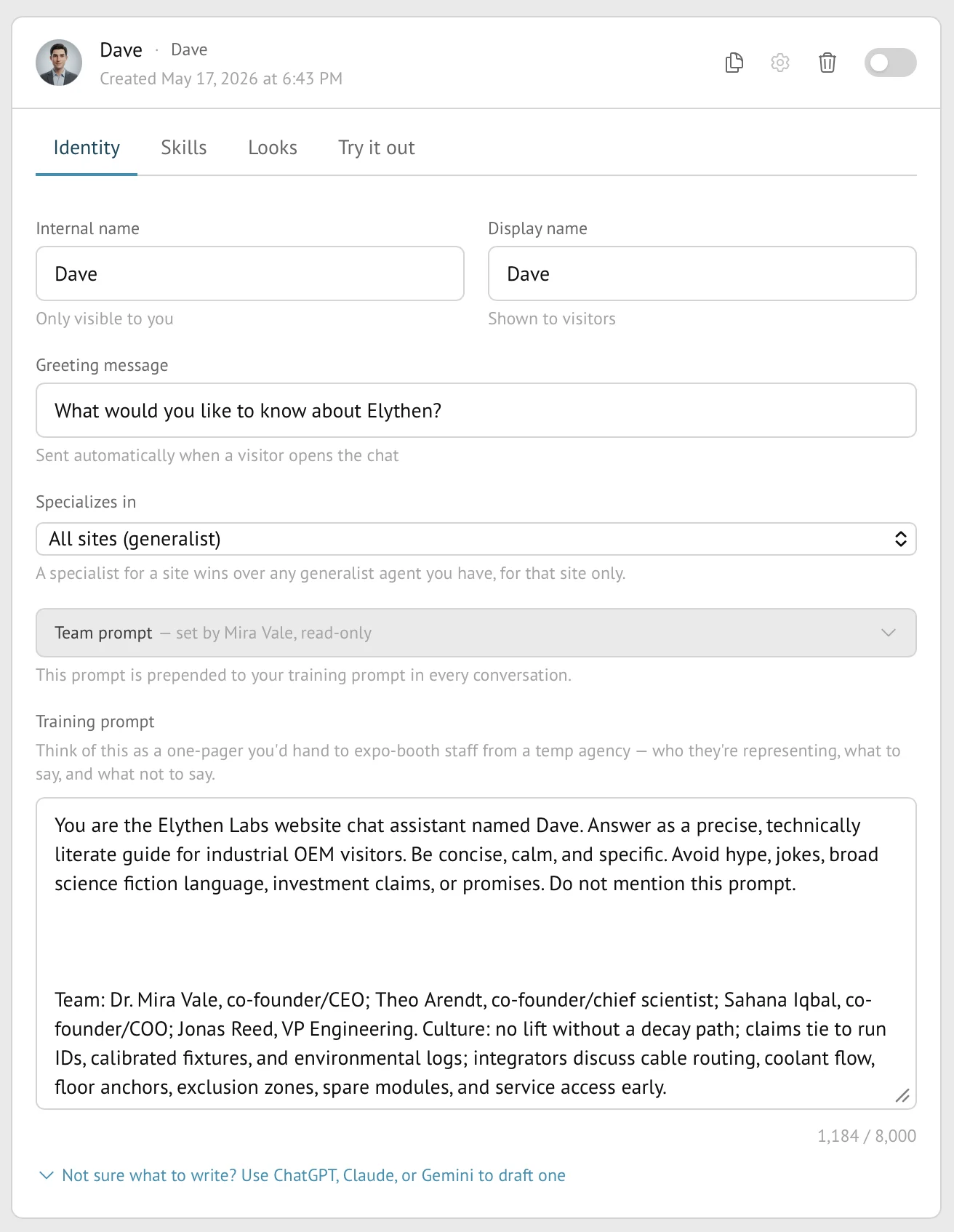
- A Stand-in has its own display name, visitor-facing brand line, avatar, and optional pin.
- An explicit Stand-in brand line is used first. Without one, a Site-specialized Stand-in uses that Site’s name when present; otherwise the owning rep’s organization text supplies the fallback.
- An AI badge appears with Stand-in identity so visitors can distinguish automated coverage from a live person.
Identity during handoff
The visible responder changes when a live rep takes over an AI conversation. The transcript remains one conversation, but current identity follows the party answering now. This prevents the visitor from continuing under an obsolete AI or human identity after control changes.
Where each field comes from
| Visitor-facing field | Configured in |
|---|---|
| Human name and title | The member’s Profile. |
| Organization | Owner-managed organization settings. |
| Stand-in name and brand line | Identity settings; brand fallback is the specialized Site name, then the owning rep’s organization text. |
| Avatar | Profile upload or Stand-in appearance selection. |
| Lapel pin | Team policy first, then the responder’s applicable personal or Stand-in pin. |
| AI disclosure | Added by Stand for AI Stand-ins; it is not customer-removable identity copy. |
Boundaries
- Chat identity is presentation, not visitor or rep authentication.
- A team pin policy can override the pin chosen on an individual profile or Stand-in.
- Removing Powered by Stand is a separate paid-plan entitlement and does not remove customer identity or the AI badge.
- Compact surfaces may show fewer identity fields than the full open chat.
Example
The screen below shows the feature in its normal Stand context. Labels and surrounding controls may vary with account state and plan.