Stand-in skills
Human follow-up
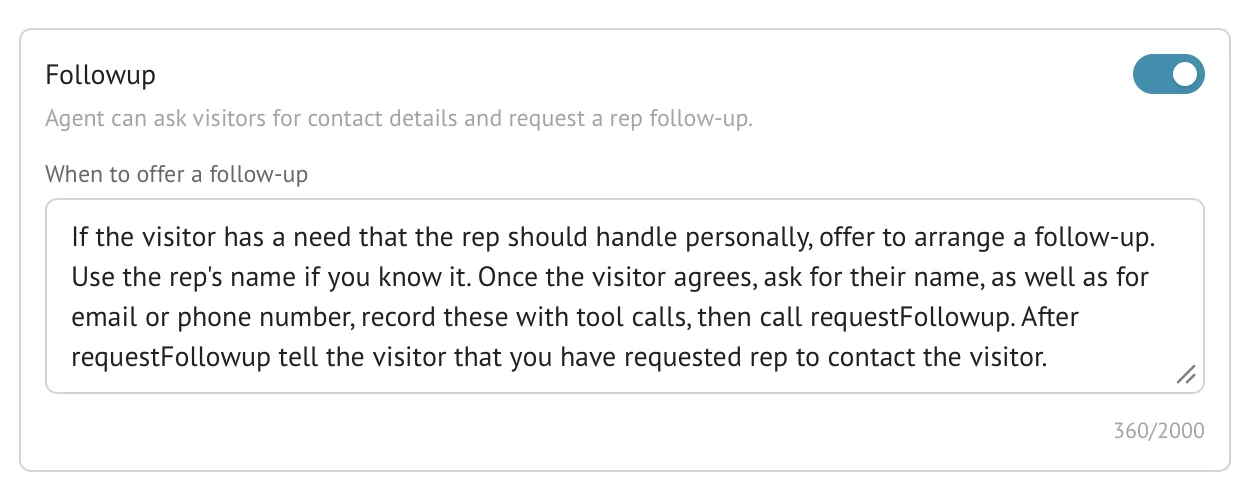
The Human follow-up skill lets an AI Stand-in offer to have a person continue after the conversation. Once the visitor agrees and supplies contact details, Stand records the request and emails the configured recipient with the contact and transcript context.
- Availability
- All plans
- Configured in
- Dashboard → Stand-ins → select a Stand-in → Edit → Skills → Follow-up
- Category
- Stand-in skills
- Reference status
- Current
Before you begin
Plan availability: All plans.
Prerequisite: A saved Stand-in with the skill enabled and a valid recipient email or an owner account email available as fallback.
Key boundary: A follow-up request records and notifies; it does not schedule a meeting, guarantee a response time, verify the contact details, or automatically assign a live rep.
Configure the skill per Stand-in
| Setting | Behavior |
|---|---|
| Follow-up | Enabled by default. Turn it off to remove this Stand-in’s follow-up skill, or save edited guidance and recipient settings before testing. |
| When to offer a follow-up | Private guidance telling the Stand-in which needs should be handed to a person. The field accepts up to 2,000 characters. |
| Contact request recipient | Optional notification email. It is normalized and validated; leave it blank to use the Stand-in owner’s account email. |
Visitor follow-up flow
The enabled skill adds follow-up guidance to the Stand-in’s private prompt. When a need matches that guidance, the Stand-in offers human contact rather than silently sending visitor data.
- The visitor agrees to follow-up.
- The Stand-in asks for the visitor’s name and at least a usable email address or phone number as appropriate.
- Stand stores the structured contact details with the current session.
- The Stand-in submits one follow-up request and confirms to the visitor that the request was recorded.
- After the conversation closes, Stand queues the contact request email with available contact details and transcript context for the configured recipient or owner fallback. The recipient then contacts the visitor using their own email or phone tools.
Relationship to unanswered live chat
The Stand-in skill is a proactive AI capability configured on that Stand-in. Unanswered-chat fallback is a separate recovery path triggered when a human-assigned visitor waits 60 seconds without a reply.
Both paths can collect an email for later contact, but enabling this skill does not change the timeout or teammate-transfer behavior of live-chat recovery.
Missing recipient and delivery behavior
- A non-empty recipient must be a valid email address and no longer than the supported 320-character field.
- If the custom recipient is blank, Stand uses the Stand-in owner’s account email.
- If neither address is available, Stand cannot queue the notification email; the conversation record remains the source for the captured request.
- Email delivery is operationally separate from visitor consent and contact capture. A recorded request does not prove the recipient read the email.
- Digest cadence is unrelated; changing the follow-up recipient does not redirect digest emails.
Availability and boundaries
- Human follow-up is available on every plan and configured separately for each Stand-in.
- The skill should offer contact only after the visitor’s need makes human continuation relevant.
- Contact details remain subject to organization retention and deletion controls.
- The follow-up email can contain personal contact details and transcript context; configure a recipient authorized to receive that information.
Example
The screen below shows the feature in its normal Stand context. Labels and surrounding controls may vary with account state and plan.